
Learn Vibe Coding with AI Agents
Vibe coding means building software by describing what you want to an AI coding agent, running what it produces and steering with feedback, instead of typing every line yourself. It's how a growing share of real…
Course description
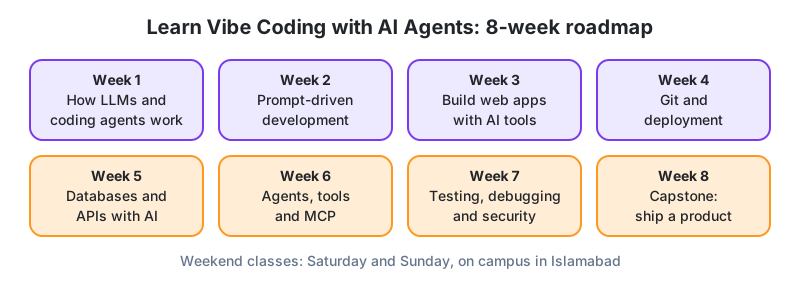
Vibe coding means building software by describing what you want to an AI coding agent, running what it produces and steering with feedback, instead of typing every line yourself. It's how a growing share of real products get built now, and it has opened software to teachers, shop owners, analysts and students who never studied computer science. Our first batch included a school administrator and a pharmacy owner, and both shipped. This eight-week course teaches you to do it well, fast, but with enough judgement to ship something that works and is safe.
You'll learn how language models and coding agents work under the hood, how to write prompts that read like good tickets, and how to build complete web apps with agent-based tools such as Claude Code and Cursor-style editors. Along the way you pick up the fundamentals every builder needs, Git and deployment, databases and APIs, testing and debugging, security basics. Week six goes deeper into agents themselves, tool use, the Model Context Protocol (MCP) and automation. The capstone is a real product with real users, on a public URL.
No programming background needed. Classes are live on Saturdays and Sundays, on the Islamabad campus or online, and every session is hands-on with your own laptop.
What You'll Learn
Skills You'll Gain
Test Yourself
Run your first coding agent
Set up an AI coding tool, ask it to build a tip-splitting calculator, then read every file it created and write one paragraph on how the code works. Most students are surprised how much they can follow.
Hands-on Lab Task
Write a spec that gets it right
Turn a vague request into a spec with context, acceptance criteria and constraints, then run the agent on both versions for the same feature and compare what came back.
Hands-on Lab Task
Build a class attendance app
Scaffold a Next.js-style app with a form, a server route and a database table, then add a monthly attendance summary page through small, separate prompts.
Hands-on Lab Task
Commit, push and deploy
Create a GitHub repository, commit in small named steps, connect a hosting platform, set environment variables and get a live preview URL for every branch.
Hands-on Lab Task
Automate a weekly report with an agent
Build an agent that reads data through an MCP server, drafts a weekly summary and sends it only after a human says yes, with a log of every tool call.
Hands-on Lab Task
Break and fix your own app
Run the testing, debugging and security checklist on your own project. Add tests, reproduce a bug, fix an injection risk and scrub a secret out of Git history.
Hands-on Lab Task
Curriculum
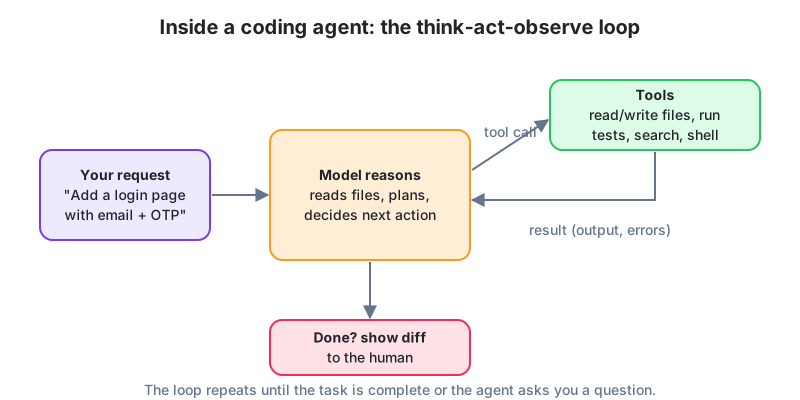
You can't steer a tool you don't understand, and most of the bad outcomes we've seen came from treating the agent as either a genius or an idiot. This weekend explains, in plain language, what a language model actually does, why it sometimes invents things, and how a coding agent wraps a model in a loop with tools so it can read files, write code and run commands.
What we cover
- Tokens, context windows and next-word prediction, without the maths
- Why models hallucinate and how to reduce it with context, examples and verification
- Chat models versus reasoning models versus coding agents
- The agent loop, plan, tool call, observe, repeat, plus permissions and diffs
- Setting up your toolkit, an AI coding agent, an editor, a terminal, GitHub
In the lab
Install and configure an AI coding tool, ask it to build a small tip-splitting calculator page, and trace every tool call the agent made to get there.
Bring back next week
The working calculator and a written account, in your own words, of what the agent did step by step.
Faisal Adnan
Lead Trainer, Code School of Analytics
Power BI, Data Warehousing & AI-assisted developmentFaisal leads CSA's Power BI, Data Warehouse and Vibe Coding programs, bringing a decade of hands-on BI and analytics consulting experience to every weekend batch.
10
Years Experience
6
Batches Taught
0
Students Mentored
Student Reviews
No reviews yet, be the first to enroll and share your experience.
Requirements
- No coding experience needed. If you can use a browser and install software, you're in
- A laptop (Windows, macOS or Linux) with at least 8 GB RAM and a stable connection. Online students, plan for load-shedding
- Accounts on GitHub and an AI coding tool. Free tiers are enough and we walk you through setup in week one
- Three to four hours a week outside class to build your project
Upcoming Batches
LVCWAA-Weekend-Onsite-01
Faisal Adnan · Starts 17 Oct 2026
Saturday & Sunday · 8 weeks
LVCWAA-Weekend-Online-01
Faisal Adnan · Starts 17 Oct 2026
Saturday & Sunday · 8 weeks
Fee by mode