
☰ Learn Artificial Intelligence Tutorial Menu
Building Your First AI Workflow (no-code / low-code)
Written by Faisal Adnan · Updated 26 Sept 2026 · 6 min read
The first workflow most students build sends the AI's reply straight to the customer. No check, no threshold, no log. It works beautifully for a day and then promises someone a refund the shop can't afford. So let's agree up front that the guardrails are the workflow, and the AI step is just the clever bit in the middle. No-code tools (Zapier, Make, n8n, Microsoft Power Automate) let you chain a trigger, an AI step and a few actions in an afternoon, no model training or backend needed. We'll build a real one, triaging customer messages for a small shop, and the same pattern works for invoices, CVs, survey responses and support tickets.
Anatomy of a workflow
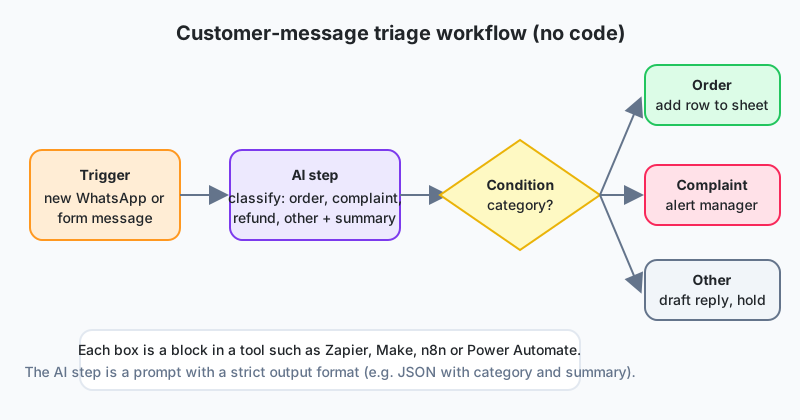
| Block | What it does | In our example |
|---|---|---|
| Trigger | Starts the run when something happens | New WhatsApp Business message or web-form submission |
| AI step | Sends a prompt (with the message) to an LLM and receives structured output | Classify into order / complaint / refund / other; extract summary and urgency |
| Condition | Branches on the AI output | Route by category |
| Actions | Do something in another app | Add a row to Google Sheets, alert the manager, draft a reply for approval |
| Guardrails | Validate, threshold, approve, log | Covered below |
Step 1: say the job in one sentence
Ours is "when a customer message arrives, classify it, summarise it in one line, and route it so nothing waits more than an hour". Then list the categories and, for each, the action. A vague job produces a vague prompt, and a vague prompt produces a workflow nobody trusts.
Step 2: write the AI step's prompt
The AI step has to return a fixed structure, or the blocks after it have nothing to grab. Ask for JSON with exact keys, and put examples in Roman Urdu as well as English, because that's what customers actually type.
You are a support triage assistant for a Lahore clothing store.
Classify the customer message into exactly one category:
  order, complaint, refund, other.
Return ONLY valid JSON with keys: category, summary (max 15 words, English),
urgency (1 = low, 2 = normal, 3 = urgent), confidence (0 to 1).
If the message is unclear, use category "other" and confidence below 0.5.

Examples:
Message: "Mera order 3 din se late hai, kab aayega?"
JSON: {"category":"order","summary":"Order 3 days late, asks delivery date","urgency":2,"confidence":0.9}
Message: "Suit ka colour photo se bilkul different hai, paisay wapas karo"
JSON: {"category":"refund","summary":"Colour mismatch, requests refund","urgency":3,"confidence":0.92}

Message: """{{message_text}}"""
The automation tool fills the {{message_text}} placeholder from the trigger. Everything else stays fixed, and that fixed text is what you version.
Step 3: build the branches
- order: append a row (timestamp, phone, summary, urgency) to the orders sheet; send an automatic "we are checking" reply.
- complaint or refund with urgency 3: post to the manager's chat with the summary and a link; draft a reply but do not send.
- other or confidence below 0.7: put in a human review queue (a sheet tab or a ticket).
Step 4: the guardrails (this is the workflow)
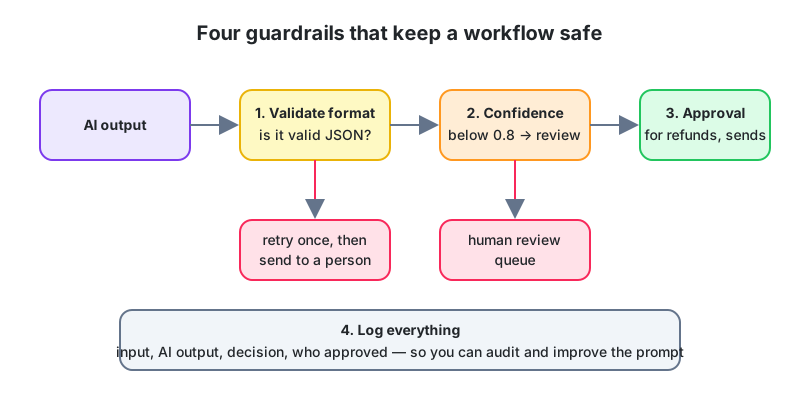
- Validate the format. If the output isn't valid JSON or a key is missing, retry once, then send it to human review. A malformed output must never reach an action.
- Confidence threshold. Anything below your line goes to a person. Start strict at 0.8 and loosen once you trust what you're seeing.
- Human approval for anything that costs money or trust. Refunds, promised delivery dates, replies to angry customers. All wait for a click.
- Log everything. Input, prompt version, AI output, branch taken, human decision. That log is your audit trail and, later, your test set.
Step 5: test before you go live
Collect 20 to 30 real past messages and mark each with the category a person would give it. Run the workflow in test mode and compare. The plain Python below shows where the prompt is weak, whether you run it in a notebook or paste the results into Excel.
import json

expected = {"m1": "order", "m2": "refund", "m3": "complaint", "m4": "other", "m5": "order"}
ai_raw = {
    "m1": '{"category":"order","summary":"Late order","urgency":2,"confidence":0.9}',
    "m2": '{"category":"refund","summary":"Colour mismatch","urgency":3,"confidence":0.93}',
    "m3": '{"category":"order","summary":"Rude rider","urgency":3,"confidence":0.6}',
    "m4": 'Sorry, I cannot classify this.',     # not JSON
    "m5": '{"category":"order","summary":"Asks size chart","urgency":1,"confidence":0.55}',
}
correct = invalid = low_conf = 0
for mid, raw in ai_raw.items():
    try:
        out = json.loads(raw)
    except json.JSONDecodeError:
        invalid += 1
        continue
    if out["confidence"] < 0.7:
        low_conf += 1
    if out["category"] == expected[mid]:
        correct += 1
print(f"correct {correct}/{len(ai_raw)}  invalid {invalid}  low-confidence {low_conf}")
You get one invalid output (the JSON-only rule needs reinforcing, or a retry), one wrong category at low confidence (correctly sent to review), and one right answer at low confidence. Iterate the prompt until the accuracy on this set is something you'd defend, then go live with the review queue on. Not before.
Cost and speed
Each AI step costs between a fraction of a rupee and a few rupees, depending on the model and message length. For triage a small, fast model is plenty. Save reasoning models for steps that genuinely need multi-step logic. Most tools show cost per run, so set a monthly cap on day one.
150 WhatsApp messages a day, two staff. A Daraz seller in Lahore built this exact workflow in Make with Google Sheets and WhatsApp Business. In week one the review queue swallowed 30% of messages. After she added six Roman Urdu examples and tightened the JSON rule it fell to 8%. Urgent complaints now reach her phone inside a minute, order questions get an instant acknowledgement, and every drafted refund reply crosses her screen first. When she hired a third person, the log sheet was the training manual.
That's the whole lesson. A workflow is a trigger, an AI step, a condition, some actions and the guardrails around them, no code required. Make the AI step return strict JSON with examples in the languages your customers use. Validate the output, threshold on confidence, require approval for anything consequential, and log everything. Test on real past messages before you go live, and keep improving the prompt from the log.
Homework
- Design a workflow for a Faisalabad exporter that reads incoming supplier invoices (PDF), extracts supplier, amount and due date, and adds them to a sheet. Name the guardrails.
- Extend the test script to compute accuracy per category. Which category needs more examples?
- Write the JSON schema (keys and allowed values) for a workflow that triages a school's parent emails.
Lesson 16 of 18
Sign in to track your progress and earn XP for every lesson you finish.