
☰ Learn Data Warehouse Tutorial Menu
Modern Cloud Warehouses: Snowflake, BigQuery, Synapse, Redshift
Written by Faisal Adnan · Updated 26 Sept 2026 · 6 min read
Ten years ago a warehouse meant buying a server, sizing it for the busiest hour of the year, and hoping the disks lasted. Today you sign up, paste a query, and pay per second. The four platforms here dominate job adverts. Under the marketing they share one architectural idea and one economic model, and your star schema runs unchanged on any of them. Learn the shared idea first. The differences are easy after that, and so is the question every client asks us in month two, which is "why is the bill so high?"
The big idea: storage and compute are separate
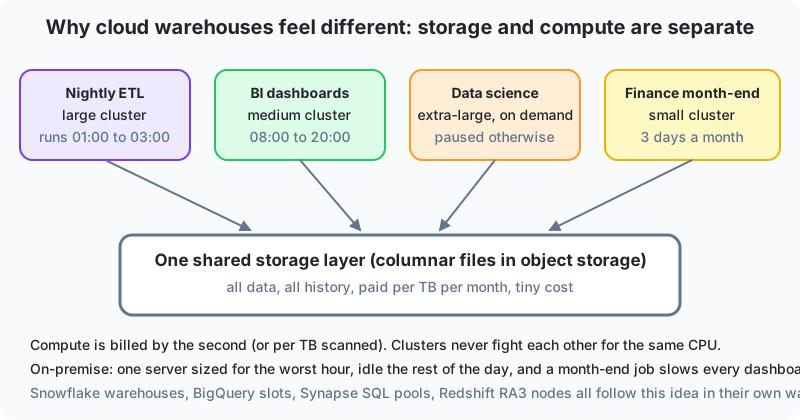
On a traditional server, CPU, memory and disk are one box. If month-end finance queries need more power, everyone pays for it all year, and a heavy job slows every other user. Cloud warehouses split the two.
- Storage is one shared layer of compressed columnar files in object storage. It's cheap (a few dollars per terabyte per month), effectively unlimited, and holds all history.
- Compute is rented in units (Snowflake warehouses, BigQuery slots, Synapse DWUs, Redshift nodes or RPUs). You can run several independently. A large one for the nightly load, a medium one for dashboards, an extra-large one a data scientist spins up for an hour and stops.
The consequences are what matter. Workloads don't interfere. You pay for compute only while it runs. Scaling is a setting rather than a purchase order. And the same data is visible to every cluster instantly, with no copies.
The four platforms
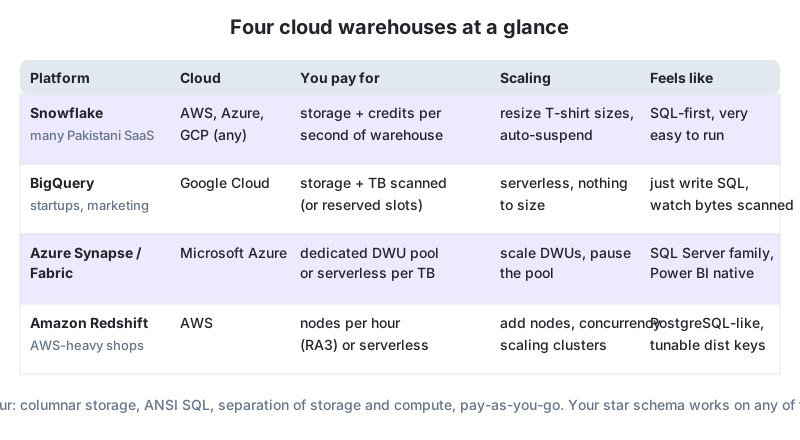
| Snowflake | Google BigQuery | Azure Synapse / Fabric | Amazon Redshift | |
|---|---|---|---|---|
| Runs on | AWS, Azure or GCP (your choice) | Google Cloud | Microsoft Azure | AWS |
| Compute unit | Virtual warehouse, T-shirt sizes XS to 6XL | Slots (serverless by default) | Dedicated SQL pool (DWUs) or serverless; Fabric capacity units | Nodes (RA3) or serverless RPUs |
| You pay for | Storage plus credits per second a warehouse runs | Storage plus bytes scanned per query (or flat-rate slots) | Pool hours (pausable) or bytes processed; Fabric capacity | Node hours or RPU seconds |
| Auto-scaling | Auto-suspend, auto-resume, multi-cluster for concurrency | Fully automatic | Manual DWU scaling; Fabric bursts | Concurrency scaling clusters; serverless auto |
| Feels like | Very easy, SQL-first, zero tuning | Just write SQL, watch bytes scanned | SQL Server family, native Power BI | PostgreSQL-like, distribution and sort keys to tune |
| Notable features | Time travel, zero-copy clones, secure data sharing | Streaming inserts, built-in ML (BQML), nested fields | One workspace with pipelines, Spark and Power BI; OneLake | Deep AWS integration, Spectrum for S3 queries |
| Where you see it in Pakistan | SaaS start-ups, fintechs, consultancies | Marketing analytics, app companies on Firebase | Enterprises on Microsoft licensing, banks, government | AWS-heavy e-commerce and logistics |
What's the same everywhere
- ANSI SQL with window functions, CTEs and
MERGE. - Columnar storage with automatic compression.
SELECT *is expensive; selecting three columns is cheap. - Bulk loading from object storage (
COPY INTO,LOAD DATA) is the fast path. Row-by-row inserts are slow and costly. - Partitioning or clustering by date to prune scans (Lesson 16).
- Star schemas, surrogate keys and SCD Type 2 all work unchanged. Some platforms don't enforce primary or foreign keys. They accept the declaration for the optimiser, but the pipeline has to guarantee uniqueness, and that catches people out on their first Snowflake project.
The same load on two platforms
-- Snowflake: load a day of POS files from cloud storage, then merge
COPY INTO stg.pos_sales
FROM @landing_stage/pos/2025-08-14/
FILE_FORMAT = (TYPE = CSV SKIP_HEADER = 1);

MERGE INTO dw.fact_sales t
USING (SELECT ... FROM stg.pos_sales) s
ON t.receipt_no = s.receipt_no AND t.line_no = s.line_no
WHEN MATCHED THEN UPDATE SET quantity = s.quantity, net_amount = s.net_amount
WHEN NOT MATCHED THEN INSERT (receipt_no, line_no, date_key, store_key, product_key, quantity, net_amount)
                     VALUES (s.receipt_no, s.line_no, s.date_key, s.store_key, s.product_key, s.quantity, s.net_amount);

ALTER WAREHOUSE etl_wh SUSPEND;   -- stop paying the moment the load is done

-- BigQuery: same idea, partitioned and clustered table, billed by bytes scanned
CREATE TABLE dw.fact_sales (
  date_key INT64, store_key INT64, product_key INT64,
  receipt_no STRING, line_no INT64, quantity INT64, net_amount NUMERIC,
  sale_date DATE
)
PARTITION BY sale_date
CLUSTER BY store_key, product_key;

LOAD DATA INTO stg.pos_sales
FROM FILES (format = 'CSV', uris = ['gs://retail-landing/pos/2025-08-14/*.csv'], skip_leading_rows = 1);

-- Costs 1/36th of a full scan because of the partition filter
SELECT store_key, SUM(net_amount)
FROM dw.fact_sales
WHERE sale_date BETWEEN '2025-08-01' AND '2025-08-31'
GROUP BY store_key;
Cost habits that matter more than platform choice
- Auto-suspend compute after a minute or two of idleness. A forgotten cluster is the classic first-month surprise bill.
- Filter on the partition column and select only the columns you need. On BigQuery this is the whole bill.
- Load in batches from files, not row by row from an application.
- Give BI tools an aggregate or an imported model instead of hitting the warehouse for every slicer click.
- Set budgets and alerts on day one. Every platform supports them, and when the bill arrives in dollars and the budget was set in rupees, a surprise hurts twice.
The first BigQuery bill: an Islamabad e-commerce start-up moved from a PostgreSQL reporting replica to BigQuery. The first month's bill came in at three times the estimate because a Looker Studio dashboard ran
SELECT *over the whole sales table on every page refresh. A date partition, a clustered store key and a small daily aggregate table for the dashboard cut scanned bytes by about 97 percent. What we took from it is that on cloud warehouses the modelling and query habits from this track are also your cost controls.
What to keep
Cloud warehouses separate cheap shared storage from on-demand compute, which removes interference and idle cost. Snowflake, BigQuery, Synapse/Fabric and Redshift differ in billing and ecosystem but share columnar storage and ANSI SQL, so your star schema, surrogate keys and SCD logic port between them with minor syntax changes. Bulk loads from object storage, partition filters and narrow column lists are both performance and cost habits. Auto-suspend and budget alerts go in on day one.
Before the next class
- A Karachi bank on Microsoft licensing, a Lahore mobile-game studio using Firebase, and a logistics firm running everything on AWS each want a warehouse. Recommend a platform for each and give one reason.
- A BigQuery table has 3 years of sales (72 GB). Estimate the bytes scanned by a query for one month with and without partitioning by date, assuming even distribution.
- Write the Snowflake command sequence for a nightly job: resume the ETL warehouse, copy files, merge, suspend. Why does the order matter for cost?
Lesson 14 of 18
Sign in to track your progress and earn XP for every lesson you finish.