
☰ Learn Data Warehouse Tutorial Menu
The Date Dimension and Time Intelligence
Written by Faisal Adnan · Updated 26 Sept 2026 · 6 min read
Every warehouse shares one dimension, and it's the one beginners underestimate most. The date dimension looks trivial (one row per day) yet every trend, comparison and fiscal report the business will ever ask for rests on it. Pakistani businesses add twists of their own. A July-to-June fiscal year, Ramadan and Eid effects that move through the calendar, provincial holidays. When I built my first date table I left out the fiscal columns, and the CFO's first question was fiscal year-to-date. This lesson makes sure you don't repeat that.
Why not just use a DATE column?
SQL can pull year, month and weekday out of a date with a function. It can't tell you whether 14 August is a public holiday, whether a day falls in Ramadan, which fiscal quarter it belongs to, or what "the same day last year" means for a business that compares Saturday with Saturday. Those are facts about the business calendar. The right place for facts is a table, computed once and shared by every report.
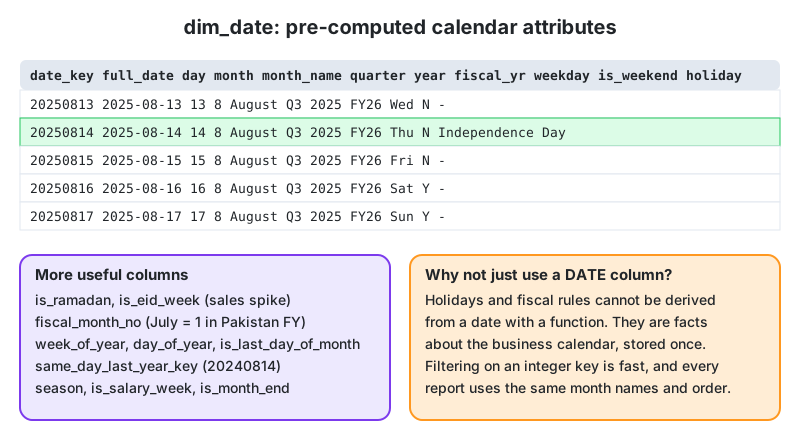
Designing dim_date
| Column group | Columns | Purpose |
|---|---|---|
| Key | date_key (INT, yyyymmdd), full_date (DATE) | Readable integer key; partition column for facts |
| Calendar | day, day_name, month, month_name, quarter, year, week_of_year, day_of_year | Standard grouping |
| Sorting helpers | month_start_date, year_month (202508), month_sort | So "Aug" sorts after "Jul", not alphabetically |
| Fiscal | fiscal_year (FY26 for Jul 2025 to Jun 2026), fiscal_quarter, fiscal_month_no (Jul = 1) | Pakistan government and most listed companies |
| Flags | is_weekend, is_holiday, holiday_name, is_ramadan, is_eid_week, is_month_end, is_salary_week | Explain sales spikes and dips |
| Relative | same_day_last_year_key, prior_day_key, is_current_month | Year-over-year without date arithmetic in every query |
Populate it for a wide range (say 2015 to 2035) in one go. Ramadan and Eid dates come from a small lookup table you maintain yearly, since they follow the lunar calendar and are announced by moon sighting. Decide a few things up front. Does the week start on Monday or Saturday (retail in Pakistan often uses Saturday)? Is Friday a half day? Which holidays are national and which provincial?
The date dimension is also the most common role-playing dimension. An order has an order date, a ship date and a delivery date. A loan has an application date and a disbursement date. All of them point to the same physical dim_date table through different foreign keys. In SQL you join it several times with aliases. In Power BI you create one active relationship and use inactive ones with USERELATIONSHIP, or import the table twice under different names. Either way there's still only one calendar to maintain.
Generating the table
CREATE TABLE dw.dim_date AS
SELECT
  TO_CHAR(d, 'YYYYMMDD')::INT                         AS date_key,
  d::DATE                                             AS full_date,
  EXTRACT(DAY FROM d)::INT                            AS day,
  TO_CHAR(d, 'Dy')                                    AS day_name,
  EXTRACT(MONTH FROM d)::INT                          AS month,
  TO_CHAR(d, 'Mon')                                   AS month_name,
  EXTRACT(QUARTER FROM d)::INT                        AS quarter,
  EXTRACT(YEAR FROM d)::INT                           AS year,
  TO_CHAR(d, 'YYYYMM')::INT                           AS year_month,
  -- Pakistan fiscal year: July to June, named by the ending year
  CASE WHEN EXTRACT(MONTH FROM d) >= 7
       THEN EXTRACT(YEAR FROM d)::INT + 1
       ELSE EXTRACT(YEAR FROM d)::INT END             AS fiscal_year,
  ((EXTRACT(MONTH FROM d)::INT + 5) % 12) + 1         AS fiscal_month_no,
  EXTRACT(ISODOW FROM d) IN (6, 7)                    AS is_weekend,
  (d = (DATE_TRUNC('month', d) + INTERVAL '1 month - 1 day')::DATE) AS is_last_day_of_month,
  TO_CHAR(d - INTERVAL '1 year', 'YYYYMMDD')::INT     AS same_day_last_year_key
FROM GENERATE_SERIES(DATE '2015-01-01', DATE '2035-12-31', INTERVAL '1 day') AS d;

ALTER TABLE dw.dim_date ADD PRIMARY KEY (date_key);

-- Holidays and Ramadan come from maintained lookup tables
ALTER TABLE dw.dim_date ADD COLUMN holiday_name TEXT, ADD COLUMN is_ramadan BOOLEAN DEFAULT FALSE;
UPDATE dw.dim_date d SET holiday_name = h.name
FROM ref.public_holidays h WHERE h.holiday_date = d.full_date;
UPDATE dw.dim_date d SET is_ramadan = TRUE
FROM ref.ramadan_periods r WHERE d.full_date BETWEEN r.start_date AND r.end_date;
Time intelligence
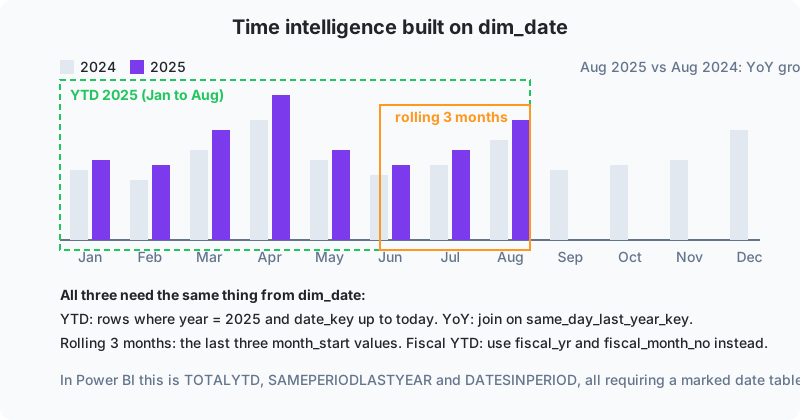
"Time intelligence" is the family of calculations that compare periods. Year to date (YTD), month to date, same period last year, year-over-year growth, rolling 3 or 12 months, fiscal YTD. All of them are simple once dim_date exists:
-- Monthly sales with same month last year and YoY growth
WITH monthly AS (
  SELECT d.year_month, SUM(f.net_amount) AS net_sales
  FROM dw.fact_sales f
  JOIN dw.dim_date d ON d.date_key = f.date_key
  GROUP BY d.year_month
)
SELECT m.year_month,
       m.net_sales,
       ly.net_sales AS net_sales_ly,
       ROUND(100.0 * (m.net_sales - ly.net_sales) / NULLIF(ly.net_sales, 0), 1) AS yoy_pct
FROM monthly m
LEFT JOIN monthly ly ON ly.year_month = m.year_month - 100   -- same month, previous year
ORDER BY m.year_month;

-- Fiscal year-to-date for FY26 up to a given date
SELECT SUM(f.net_amount) AS fytd_sales
FROM dw.fact_sales f
JOIN dw.dim_date d ON d.date_key = f.date_key
WHERE d.fiscal_year = 2026
  AND d.full_date <= DATE '2025-08-14';
In Power BI, the same ideas are DAX functions (TOTALYTD, SAMEPERIODLASTYEAR, DATESINPERIOD), and they only work when the model contains a contiguous date table marked as the date table. That table is your dim_date, imported as-is. Fiscal YTD in DAX takes the year-end as a parameter ("30/06"), which is why having the fiscal columns already in the table saves so much confusion.
Time of day
Don't put hours and minutes in dim_date (that's 525,600 rows a year). Use a separate dim_time with one row per minute (1,440 rows) or per hour, holding hour, minute, am/pm, shift name and "is peak hour". A fact carries both a date_key and a time_key. Retail, call centres and utilities all need this.
The 40 percent drop that wasn't news: a Karachi restaurant chain saw sales fall by about 40 percent in one week and the operations head panicked. The analyst added is_ramadan to dim_date, and the dashboard immediately showed the same dip in the previous two years, with a bigger Eid rebound each time. The next year the same flag drove staffing. Fewer lunch staff during Ramadan, double staff for the three Eid days. One boolean column turned a yearly panic into a yearly plan.
Summing up
- dim_date is a physical table, one row per day, populated decades ahead, with a yyyymmdd integer key.
- It stores calendar facts no function can derive. Holidays, Ramadan, fiscal periods, salary weeks.
- Pakistan's July-to-June fiscal year needs explicit fiscal_year and fiscal_month_no columns.
- YTD, YoY and rolling calculations become joins and filters. Power BI time intelligence needs this table marked as the date table.
- Time of day lives in a separate dim_time.
Work through these
- Compute by hand the fiscal_year and fiscal_month_no for 2025-06-30, 2025-07-01 and 2025-12-25 using the formula in the DDL.
- Write a query for "rolling 3-month sales" ending in each month of 2025, using year_month arithmetic or a window function.
- Design dim_time for a K-Electric complaints centre. List its columns and one report that needs it.
Lesson 11 of 18
Sign in to track your progress and earn XP for every lesson you finish.