
☰ Learn Data Warehouse Tutorial Menu
Slowly Changing Dimensions (SCD Types 0–3)
Written by Faisal Adnan · Updated 26 Sept 2026 · 6 min read
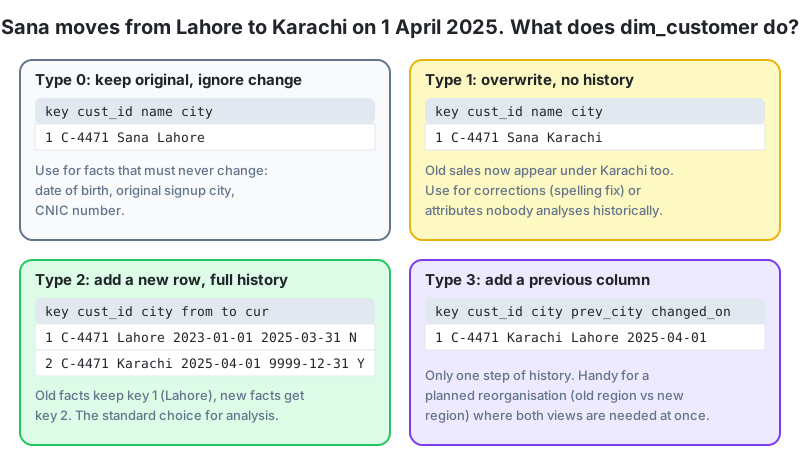
Dimensions describe things, and things change. Customers move house, products change category, employees get promoted and transferred, stores get new managers. The operational system just overwrites the old value. The warehouse has to decide, attribute by attribute, whether to remember and how. Those decisions are the slowly changing dimension (SCD) strategies, and Type 2 in particular is what makes "time-variant" from Lesson 1 real instead of a slogan.
The problem in one example
Sana Rauf has been a customer since 2023, in Lahore. On 1 April 2025 she moves to Karachi and keeps buying. The regional manager for Punjab asks, "What were my 2024 sales?" If Sana's row now says Karachi, her 2024 purchases have quietly moved to Sindh's total, and Punjab's 2024 number changed even though 2024 is over. That's the damage one unplanned overwrite does, multiplied by every customer who moved.
The types
| Type | Action on change | History kept | Use when |
|---|---|---|---|
| 0 Retain original | Ignore the change | Original value only | Attributes that must never change: date of birth, CNIC, original signup city |
| 1 Overwrite | Update the row in place | None | Corrections (spelling), and attributes nobody analyses over time |
| 2 Add new row | Close the old row, insert a new row with a new surrogate key | Full history | Anything analysed by "as it was at the time": city, segment, grade, branch, category |
| 3 Add new column | Move old value to a previous_ column, write new value | One previous value | Planned reorganisations where both old and new views are needed for a while |
You'll also hear of Type 4 (history in a separate table), Type 6 (a hybrid of 1, 2 and 3) and Type 7. They're variations. Master 0 to 3 and you can read the rest.
Type 2 in detail
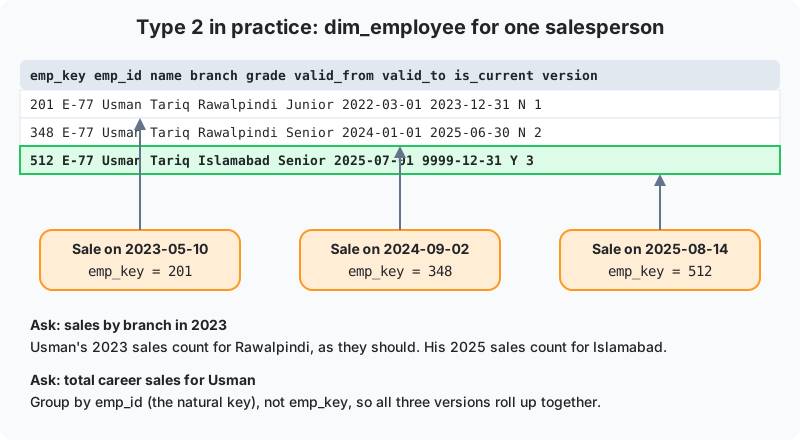
A Type 2 dimension adds housekeeping columns:
valid_fromandvalid_to, the date range in which this version was true. The open version gets a far-futurevalid_tosuch as 9999-12-31 (not NULL, so range queries stay simple).is_current, a flag so "give me today's version" is a simple filter.- Optionally
version_noand arow_hashof the tracked attributes to detect changes quickly.
When the nightly load sees a changed value for a tracked attribute, it closes the current row (sets valid_to to yesterday and is_current to false) and inserts a new row with a new surrogate key. Fact rows loaded from that day onward pick up the new key. Old facts keep the old key. Nothing about the past is rewritten.
Two query patterns follow from this:
- "As it was then." Join fact to dimension on surrogate key. Sana's 2024 sales stay in Lahore.
- "As it is now." Join on the natural key to the
is_currentrow. All of Sana's sales appear under Karachi, which is right for "where do my current customers live".
Both are valid questions, and the warehouse can answer both only because Type 2 kept the versions.
The Type 2 merge
-- Staging holds today's full customer extract: stg.customers(cust_id, name, city, segment)
-- Tracked (Type 2) attributes: city, segment.   Type 1 attribute: name.

-- Step 1: Type 1 corrections (overwrite name on every version)
UPDATE dw.dim_customer d
SET    name = s.name
FROM   stg.customers s
WHERE  d.customer_id = s.cust_id AND d.name <> s.name;

-- Step 2: close current rows whose tracked attributes changed
UPDATE dw.dim_customer d
SET    valid_to = CURRENT_DATE - 1, is_current = FALSE
FROM   stg.customers s
WHERE  d.customer_id = s.cust_id
  AND  d.is_current
  AND (d.city <> s.city OR d.segment <> s.segment);

-- Step 3: insert new versions (and brand-new customers) as current rows
INSERT INTO dw.dim_customer (customer_id, name, city, segment, valid_from, valid_to, is_current)
SELECT s.cust_id, s.name, s.city, s.segment, CURRENT_DATE, DATE '9999-12-31', TRUE
FROM   stg.customers s
LEFT JOIN dw.dim_customer d
       ON d.customer_id = s.cust_id AND d.is_current
WHERE  d.customer_key IS NULL;   -- no current row exists (new, or just closed)

-- Fact load then looks up the current key for each sale
SELECT d.customer_key
FROM   stg.pos_sales p
JOIN   dw.dim_customer d
       ON d.customer_id = p.cust_id AND d.is_current;
Run in this order (Type 1 first, then close, then insert) the script is idempotent. A second run on the same day finds nothing changed. For late-arriving facts (a sale from last week that turns up today), look up the version whose valid_from and valid_to contain the sale date instead of is_current. Late rows are more common than you'd think. One retailer's offline stores synced whenever their internet came back, sometimes days later.
Choosing per attribute, not per table
A single dimension mixes types. In dim_employee, employee ID is Type 0, name spelling is Type 1, branch and grade are Type 2, and during a reorganisation "old_region" might be Type 3. Write the decision down in a data dictionary. The pipeline must implement exactly that list, and users need to know which attributes have history.
What Type 2 costs
- More rows. A customer dimension with frequent segment changes can grow several times over. A mini-dimension (Lesson 9) for rapidly changing attributes keeps the main dimension calm.
- Counting distinct customers must use the natural key, not the surrogate key, or one person counts three times. This is the mistake we see most often in student Power BI models.
- Users need to understand "current" versus "as-was". Name columns clearly (city_at_time_of_sale in a mart if necessary) and train them.
Teachers who moved campus every August: a Lahore school network reassigns teachers between campuses at the start of each year. Their first warehouse used Type 1 for teacher campus, so the "results by campus by teacher" report for the previous year changed after every reshuffle, and principals stopped believing it. Converting dim_teacher to Type 2 for campus and subject fixed the historical reports. It also made a new question answerable, "how do results change in the year after a teacher moves campus?", which the academic director had wanted for years.
In one breath
Sources overwrite. The warehouse decides how to remember, attribute by attribute. Type 0 never changes, Type 1 overwrites, Type 2 adds a versioned row (valid_from, valid_to, is_current, its own surrogate key), Type 3 keeps one previous value in a column. Join on surrogate key for "as it was" and on natural key plus is_current for "as it is now". Load Type 1, close, insert, in that order, and count distinct on natural keys.
Over to you
- For dim_product (sku, name, category, unit_cost, supplier, launch_date), assign an SCD type to each attribute and justify one choice.
- Using the three employee versions in the diagram, write the query "sales by branch in 2024" and explain which emp_key values appear in the result.
- A sale dated 2025-03-20 arrives on 2025-04-05, after Sana's move. Write the lookup that finds the correct customer_key for it.
Lesson 10 of 18
Sign in to track your progress and earn XP for every lesson you finish.