
☰ Learn Data Warehouse Tutorial Menu
OLTP vs OLAP: Two Kinds of Databases
Written by Faisal Adnan · Updated 26 Sept 2026 · 6 min read
"Sir, why not just run the reports on the main database? It already has all the data." We get this question in every batch, usually in week two, and it's a good one. A database built to run a business and a database built to analyse a business have opposite jobs, and a design that's perfect for one is painful for the other. This lesson gives you the two words (OLTP and OLAP) and the reasoning behind the split.
Two workloads
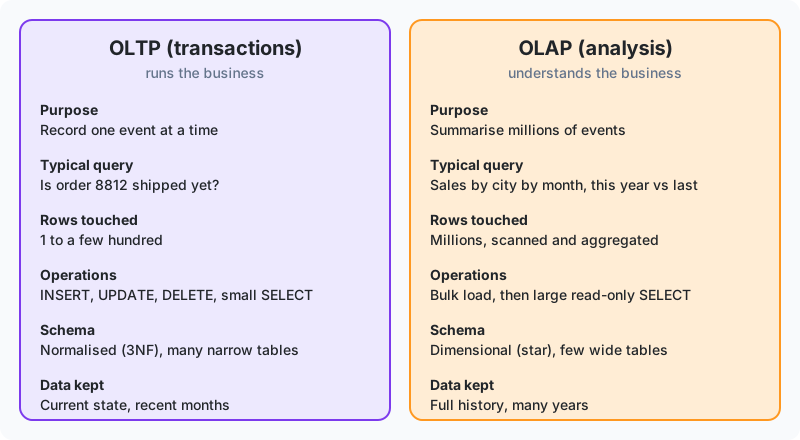
OLTP stands for Online Transaction Processing. It's the world of the POS terminal, the banking app, the airline booking site. Thousands of users each do something small and urgent, such as inserting one sale, updating one balance or looking up one order. Each operation has to be fast, correct and safe even when a hundred people are doing the same thing at once.
OLAP stands for Online Analytical Processing. It's the world of the analyst and the dashboard. A few users each ask something large and patient. Total sales by region by month for three years. Average delivery time by courier. Customers who bought in Ramadan but not at Eid. Each query reads millions of rows and returns a few hundred summarised ones.
Line by line
| Aspect | OLTP (operational system) | OLAP (warehouse) |
|---|---|---|
| Main job | Record events reliably | Summarise events for decisions |
| Users | Thousands: cashiers, customers, apps | Tens: analysts, managers, dashboards |
| Query shape | Few rows, all columns of those rows | Millions of rows, few columns |
| Writes | Constant small inserts and updates | Large batch loads, then read-only |
| Response time | Milliseconds, always | Seconds to minutes is acceptable |
| Schema | Normalised (3NF): no repeated data, many tables | Dimensional: some repetition, few wide tables |
| History | Current state; old values are overwritten | Years of history; old values kept |
| Storage layout | Row-oriented | Column-oriented |
| Typical products | PostgreSQL, MySQL, SQL Server, Oracle | Snowflake, BigQuery, Synapse, Redshift, SQL Server with columnstore |
Why one database can't do both well
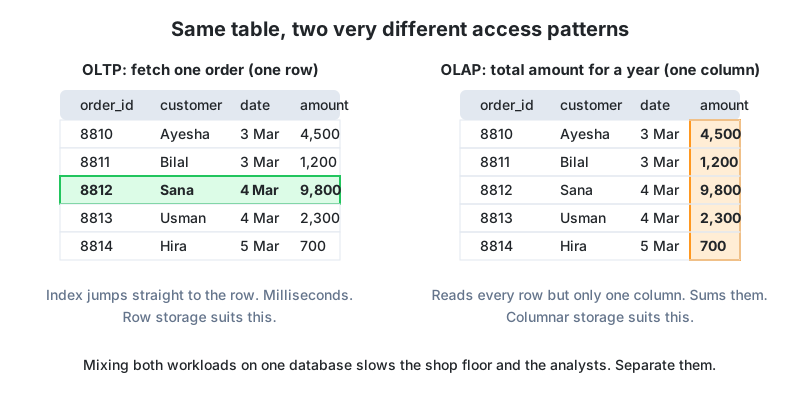
Look at the diagram. An OLTP query wants one row and every column of it. A row-oriented database stores each row together on disk, so an index lookup reads one small block. Perfect. An OLAP query wants one column across every row. In a row store the engine has to read every block of the table and throw most of each one away. A column store keeps each column together, so it reads only what it needs, already compressed. The two layouts are physically incompatible, so you pick one per system.
The second problem is interference. A regional manager runs a three-year trend report at 1 pm. The query takes over the disks and memory of the POS database for two minutes. For those two minutes every cashier in every shop watches the terminal freeze. We've seen a retailer lose an afternoon's sales this way, and the culprit was a well-meaning manager with a new Excel connection. Moving analysis to a separate machine removes the interference completely.
The third problem is history. When a customer changes their phone number, the OLTP system overwrites the old one, correctly, because the app only needs the current number. When a product is re-priced, the old price is gone. Analysis needs the past. The warehouse is where the past is kept on purpose.
The same question on both systems
Say the OLTP schema of a Daraz-style marketplace stores orders the normal way. These are the practice database tables, so you can run the first query yourself.
-- OLTP: normalised, one fact stored once
-- orders(id, customer_id, order_date, status)
-- order_items(id, order_id, product_id, quantity, unit_price)
-- products(id, product_name, category, price, stock_quantity)
-- customers(id, customer_name, city, country, signup_date)

-- "Revenue by city and category, last 30 days"
SELECT c.city, p.category,
       SUM(oi.quantity * oi.unit_price) AS revenue
FROM orders o
JOIN customers c   ON c.id = o.customer_id
JOIN order_items oi ON oi.order_id = o.id
JOIN products p    ON p.id = oi.product_id
WHERE o.order_date >= CURRENT_DATE - INTERVAL '30 days'
  AND o.status = 'delivered'
GROUP BY c.city, p.category;
This works, and on the practice database it runs in milliseconds because the data is tiny. Now imagine 40 million order items. The query joins four tables, reads every column of every row it touches, and competes with live checkout traffic. In the warehouse the same question reads a pre-joined fact_sales table with integer keys, on a columnar engine, on a separate machine.
-- OLAP: dimensional, pre-integrated
SELECT s.city, p.category, SUM(f.net_amount) AS revenue
FROM fact_sales f
JOIN dim_customer s ON s.customer_key = f.customer_key
JOIN dim_product p  ON p.product_key  = f.product_key
WHERE f.date_key >= 20250815
GROUP BY s.city, p.category;
Fewer joins, integer keys, a filter on a partition column, and no shopper waiting for a checkout page while it runs.
Why the fraud team got its own database: a Karachi bank's fraud team needed to score every card transaction against the customer's 12-month spending pattern. Operations refused to let that run on the core banking database, and they were right, because a slow query there means ATMs time out. The answer was a warehouse fed every 15 minutes with new transactions plus 13 months of history. Fraud models read from the warehouse and the ATMs never notice. This near-real-time OLAP pattern is now standard in Pakistani banks and wallets, and it's what "we need real-time reporting" usually turns out to mean once you ask a few questions.
Hybrid and grey areas
You'll hear the term HTAP (hybrid transactional/analytical processing) for databases that try to do both, and you'll see PostgreSQL used as a small warehouse. Both are real. A read replica of the OLTP database is a common halfway house too. It fixes interference, but it's still a row store with no history, so it postpones the split rather than avoiding it. As soon as analysis slows the app, or the app can't keep the history analysis needs, separate them.
Quick recap
- OLTP records many small, urgent transactions. OLAP answers few large, patient questions.
- They differ in query shape, schema, storage layout and how much history they keep.
- Analytics on the operational database means interference, lost history and the wrong storage layout.
- Small data can live in one database. Growth, users and history force the split.
Homework
- Classify each as OLTP or OLAP: (a) a JazzCash transfer being confirmed, (b) K-Electric computing average bill per feeder for last winter, (c) a student checking their result on a portal, (d) the education board comparing pass rates across 200 schools over five years.
- Explain to a shop owner, in plain words, why the trend report shouldn't run on the POS database. Use the two-minute freeze.
- The OLTP query above uses four joins; the OLAP one uses two. Write down what work moved out of the query and into the nightly pipeline.
Lesson 2 of 18
Sign in to track your progress and earn XP for every lesson you finish.