
☰ Learn Python Tutorial Menu
Getting Started with Python
Written by Faisal Adnan · Updated 26 Sept 2026 · 5 min read
Most people who join our weekend batch in Islamabad have never written a line of code. By the end of the first Saturday they've run a Python program, broken it on purpose, and fixed it. That's the plan for this lesson too. Python is what analysts at Karachi banks, Islamabad telecoms and Lahore e-commerce sellers reach for when Excel gives up, and you'll have it running in the CSA playground within a few minutes.
So what is Python, really?
Python is a general-purpose language that Guido van Rossum released in 1991. He wanted code that reads close to plain English, so Python uses indentation instead of curly braces and usually needs fewer lines than other languages for the same job. It's interpreted. You write a text file, and a program called the interpreter runs it line by line. No build step, no compiler, nothing to wait for.
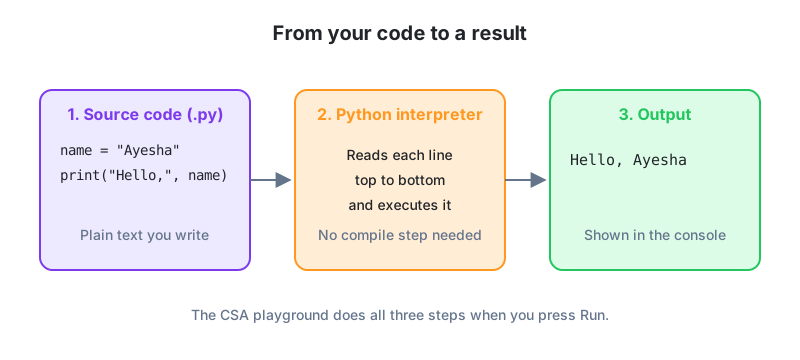
It's free, open source, and runs on Windows, macOS and Linux. We use Python 3.12 on this track. If a YouTube tutorial shows print "hello" without brackets, that's Python 2, which stopped getting updates in 2020. Close the tab.
Why analysts pick it over Excel
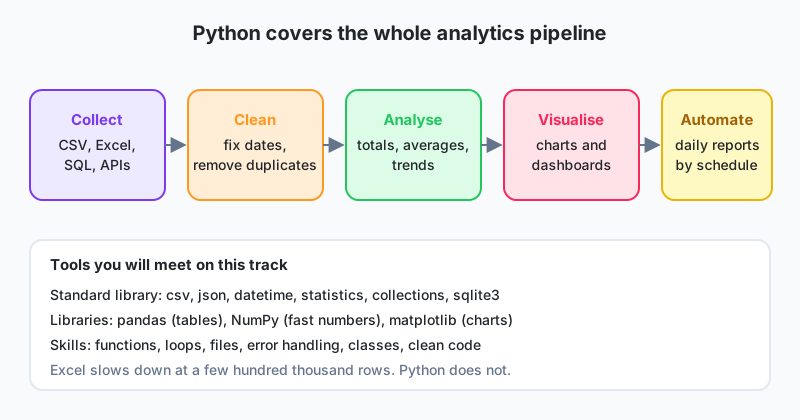
Almost every analyst in Pakistan starts in Excel, and we still use it daily. Excel is great until the file has a million rows, or the same report is due every Monday morning, or the data lives in a database or behind an API. That's where Python takes over, and the same skills carry into automation and machine learning later on.
| Task | Excel | Python |
|---|---|---|
| Clean 2 million bank transactions | Freezes or crashes | Seconds with pandas |
| Repeat a report every day | Manual clicks each time | One script, scheduled |
| Pull data from SQL or an API | Limited, fiddly | A few lines of code |
| Track changes to your work | Hard (binary files) | Plain text, works with Git |
| Quick one-off calculation | Excellent | Fine, slightly slower to start |
Python ships with a large standard library (tools that come with the language), and beyond that sits an ecosystem of add-on packages like pandas, NumPy and matplotlib. You'll meet all three near the end of this track.
Your first program
Hit the Run button on this page to open the CSA playground, type this in, and run it.
print("Assalam o Alaikum, CSA!")
The text shows up in the output panel. print is a built-in function. You hand it something in parentheses and it puts that thing on screen. The bit inside the quotes is a string.
Now something a shopkeeper might actually want.
# Anything after a hash is a comment. Python ignores it.
shop = "Saddar Mobile Point"
phones_sold = 12
price_each = 38500

revenue = phones_sold * price_each
print(shop)
print("Phones sold:", phones_sold)
print("Revenue (PKR):", revenue)
Here's what should come out.
Saddar Mobile Point
Phones sold: 12
Revenue (PKR): 462000
Three things happened there. We stored values in named variables (shop, phones_sold, price_each), we multiplied with *, and we printed several items separated by commas. Notice you never told Python that phones_sold is a number. It worked that out from the value.
Red text is your friend
New students freeze when they see an error. Don't. An error is Python telling you exactly where it got stuck. Run this on purpose:
print("Total:" + 462000)
You'll get TypeError: can only concatenate str (not "int") to str. Python won't glue text and a number together with +. Either use a comma (print("Total:", 462000)) or turn the number into text with str(462000). One habit we drill from day one is to read the last line of an error first. That line names the problem. Everything above it is just the route Python took to get there.
Indentation matters
Python groups code with indentation (four spaces), not braces. You'll use this properly from Lesson 6 with if and for. Until then, don't put spaces at the start of a line unless a lesson asks you to.
A Daraz seller's evening, before and after: A seller we trained in Lahore gets a CSV export of the day's orders. Every night someone opened it in Excel, filtered by city, summed the totals and typed the numbers into a WhatsApp message for the owner. Twenty lines of Python (you'll be able to write them by Lesson 15) now produce the same summary in under a second, with no typing slips, and it runs itself at 9 pm.
How to get the most from this track
Every lesson has runnable examples. Please don't just read them. Paste each one into the playground, run it, then change a number or a word and run it again. Before you press Run, say out loud what you expect to see. Predict, then check. That one habit separates the students who finish our batches from the ones who quietly stop around Lesson 7. The track builds in order, so do lessons 2 to 11 before jumping ahead to the data lessons. If you'd rather do this with a mentor in the room, our classroom and online options are on the courses page.
Before you move on
- Python is readable and interpreted. You write text, the interpreter runs it top to bottom.
- Analysts use it because it scales past Excel, automates repeated work and talks to databases and APIs.
print()shows output, text goes in quotes, and#starts a comment.- Variables hold values and Python works out their type on its own.
- Read the last line of an error message first.
Try this before the next lesson
- Change the shop program so it also stores
cost_each = 31000and prints the total profit (revenue minus total cost). - Write a program with three
printlines that show your name, your city and the year you plan to finish this track. - Run
print("Rs" + 500), read the error, then fix it two different ways.
Lesson 1 of 26
Sign in to track your progress and earn XP for every lesson you finish.
Practice tip: the built-in code runner is being upgraded. Until it is back, copy the examples into any SQL or Python tool you have (for example SQLite, PostgreSQL, MySQL, SQL Server or a free online editor) and run them there. You can keep reading and earning XP here.