
☰ Learn Python Tutorial Menu
Modules and the Standard Library
Written by Faisal Adnan · Updated 26 Sept 2026 · 4 min read
A JazzCash analytics team we worked with had five scripts, and each one carried its own copy of a phone-number cleaner. Over a year the five copies drifted apart, so the same number was "valid" in one report and "invalid" in another. The fix took an afternoon and it's the subject of this lesson. Python lets you put shared code in a module and import it, and it ships with a standard library of over 200 modules for maths, dates, files, randomness, statistics and databases, so you write far less than you'd think.
What a module is
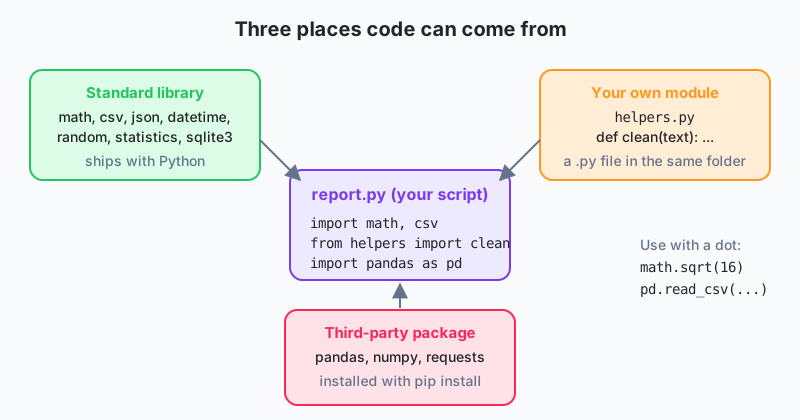
A module is just a .py file containing functions, variables and classes. import loads it and you reach its contents through a dot.
import math

print(math.sqrt(144))        # 12.0
print(math.ceil(4.2))        # 5
print(math.pi)               # 3.141592653589793
There are three ways to import, and one to avoid.
| Form | Usage | When |
|---|---|---|
import math | math.sqrt(x) | Default. Clear where names come from. |
from math import sqrt, pi | sqrt(x) | When you use a few names heavily. |
import pandas as pd | pd.read_csv() | Conventional short aliases for big libraries. |
from math import * | sqrt(x) | Avoid. Floods your namespace with unknown names. |
Imports go at the top of the file. A module is loaded once per program no matter how many times you import it.
Your own modules
Put reusable functions in a file such as helpers.py next to your script, then import them.
# helpers.py
def clean_amount(text):
    return float(text.replace("Rs", "").replace(",", "").strip())

GST_RATE = 0.17
# report.py
from helpers import clean_amount, GST_RATE

print(clean_amount("Rs 2,500") * (1 + GST_RATE))
A script often has code that should run only when the file is executed directly, not when it's imported by someone else. The standard guard looks like this.
def main():
    print("Running the report")

if __name__ == "__main__":
    main()
When Python runs a file directly, __name__ is "__main__". When the file is imported, __name__ is the module's name and main() isn't called. The playground runs a single file, so the guard is optional there, but get into the habit anyway. Every script we've ever inherited without it caused a surprise the first time someone imported it.
Standard library modules every analyst uses
| Module | What for | Lesson |
|---|---|---|
math | sqrt, log, ceil, floor, constants | 3 |
random | Sampling, shuffling, test data | this one |
statistics | mean, median, stdev | 21 |
collections | Counter, defaultdict, namedtuple | 21 |
datetime | Dates, times, durations | 16 |
csv | Read and write CSV files | 15 |
json | Read and write JSON, talk to APIs | 17 |
sqlite3 | A full SQL database in one file | 20 |
os, pathlib | Files and folders | 15 |
re | Regular expressions for pattern matching | this one |
random, for quick test data
import random

random.seed(42)                                # same "random" numbers every run
print(random.randint(1, 6))                    # dice roll
print(random.choice(["Lahore", "Karachi", "Multan"]))
print(random.sample(range(1000, 9999), 3))     # 3 distinct order numbers
amounts = [round(random.uniform(500, 5000), 2) for _ in range(5)]
print(amounts)
Use seed() whenever results must be reproducible, for example when a colleague has to get the same sample you did. We also use it to build fake datasets for class, since real bank data can't leave the bank.
re, for pattern matching
import re

text = "Call 0300-1234567 or 0321 7654321 before 5pm"
phones = re.findall(r"03\d{2}[- ]?\d{7}", text)
print(phones)                                  # ['0300-1234567', '0321 7654321']

print(re.sub(r"\s+", " ", "too   many    spaces"))   # collapse whitespace
Regular expressions are a language of their own. \d is a digit, {7} means exactly seven, [- ]? is an optional dash or space. Learn them gradually. findall and sub cover most cleaning jobs, and anything longer than one line deserves a comment saying what it matches.
Finding what a module offers
import statistics
print(dir(statistics))       # list of names in the module
help(statistics.median)      # documentation for one function
Third-party packages
Anything outside the standard library is installed with pip install package-name from the Python Package Index. The big three for analysts are pandas, NumPy and matplotlib (Lessons 22 to 24). The CSA playground has only the standard library, so those lessons ask you to run the examples locally. Lesson 25 covers virtual environments, which keep installed packages tidy per project.
Where the JazzCash drift ended: The team moved the cleaner into
jc_utils.py, replaced the five copies withfrom jc_utils import clean_phone, and added a__main__block with a handful of test calls. A bug fix now lands in one place, and runningpython jc_utils.pyshows in a second whether the cleaner still behaves.
In one breath
A module is a .py file, import loads it and you use its names with a dot, prefer import module or from module import name and skip import *, keep your own helpers in a module beside your script, guard run-me code with if __name__ == "__main__":, and remember the standard library already handles CSV, JSON, dates, statistics and SQL before you install anything.
Try this before the next lesson
- Use
randomwith a fixed seed to generate 10 fake transactions of(order_id, city, amount)and print them. - Use
re.findallto extract every CNIC in the format12345-1234567-1from a paragraph of text. - Write a small
money.pymodule withfmt(amount)that returns"Rs 1,234.50", and a__main__block that tests it with three values.
Lesson 12 of 26
Sign in to track your progress and earn XP for every lesson you finish.
Practice tip: the built-in code runner is being upgraded. Until it is back, copy the examples into any SQL or Python tool you have (for example SQLite, PostgreSQL, MySQL, SQL Server or a free online editor) and run them there. You can keep reading and earning XP here.