
☰ Learn Python Tutorial Menu
Lists
Written by Faisal Adnan · Updated 26 Sept 2026 · 4 min read
If you learn one collection type properly, make it the list. Rows read from a file, daily sales figures, customer names waiting to be cleaned, the queue of orders to process. They all live in lists. A list is an ordered, changeable sequence of values, and this lesson covers creating, reading, changing, sorting and searching them, plus the copying trap that catches every beginner exactly once.
Creating and reading lists
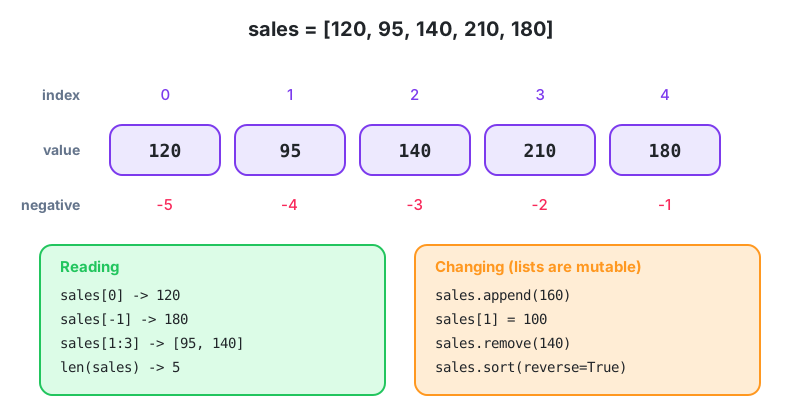
sales = [120, 95, 140, 210, 180]
mixed = ["Lahore", 2500, True, 3.5]      # any types together, though usually one type
empty = []

print(sales[0], sales[-1])       # 120 180
print(sales[1:3])                # [95, 140]
print(len(sales))                # 5
print(210 in sales)              # True
Indexing and slicing behave exactly as they did for strings in Lesson 4. Ask for an index that doesn't exist, such as sales[5], and you get IndexError.
Changing lists
Unlike strings, lists are mutable. You can replace an element, add items or remove items, all in place.
| Operation | Example | Notes |
|---|---|---|
| Replace an item | sales[1] = 100 | By index |
| Add to the end | sales.append(160) | Most common way to build a list |
| Insert at a position | sales.insert(0, 50) | Slower for big lists |
| Add many | sales.extend([90, 75]) | Or sales += [90, 75] |
| Remove by value | sales.remove(140) | First match only; error if absent |
| Remove by index | sales.pop(0) | Returns the removed item; pop() takes the last |
| Delete a slice | del sales[1:3] | |
| Empty it | sales.clear() |
queue = []
queue.append("Order 1041")
queue.append("Order 1042")
queue.append("Order 1043")
next_up = queue.pop(0)           # first in, first out
print(next_up, "| remaining:", queue)
A habit worth copying from experienced developers. If you find yourself calling pop(0) in a loop over a long list, switch to collections.deque, which is built for taking from the front.
Sorting and searching
sales = [120, 95, 140, 210, 180]

sales.sort()                       # in place, changes the list
print(sales)                       # [95, 120, 140, 180, 210]
sales.sort(reverse=True)
print(sales)                       # [210, 180, 140, 120, 95]

names = ["usman", "Ayesha", "bilal"]
print(sorted(names))               # ['Ayesha', 'bilal', 'usman']  capitals first!
print(sorted(names, key=str.lower))# ['Ayesha', 'bilal', 'usman'] correct alphabetical

print(sales.index(140))            # 2
print(sales.count(95))             # 1
print(sum(sales), max(sales), min(sales))
list.sort() changes the list and returns None. sorted(list) returns a new sorted list and leaves the original alone. Writing sales = sales.sort() is a classic. It quietly sets sales to None, and the error shows up three lines later somewhere else.
Lists of lists, or rows and columns
orders = [
    ["1041", "Lahore", 2500],
    ["1042", "Multan", 1800],
    ["1043", "Lahore", 3200],
]
print(orders[2][1])            # Lahore  (row 2, column 1)

lahore_total = 0
for order_id, city, amount in orders:
    if city == "Lahore":
        lahore_total += amount
print(lahore_total)            # 5700
Unpacking each inner list into named variables on the for line makes the loop far easier to read than row[1] and row[2]. Six months later, you won't remember what column 2 was.
The copying trap
original = [1, 2, 3]
alias = original            # NOT a copy: both names point to the same list
alias.append(4)
print(original)             # [1, 2, 3, 4]  surprised?

real_copy = original.copy() # or original[:] or list(original)
real_copy.append(5)
print(original)             # [1, 2, 3, 4]  unchanged
Remember the sticky labels from Lesson 2? Assignment sticks a second label on the same list. Use .copy() when you want an independent one. For lists that contain lists, you need copy.deepcopy(), because .copy() only copies the outer layer.
Worked example, top three customers
customers = [("Sana Traders", 412000), ("Hamza & Sons", 98000),
             ("Zara Textiles", 655000), ("Bilal Stores", 240000)]

ranked = sorted(customers, key=lambda c: c[1], reverse=True)
for rank, (name, spend) in enumerate(ranked[:3], start=1):
    print(f"{rank}. {name:<15} Rs {spend:,}")
key=lambda c: c[1] tells sorted to compare the second element of each tuple. Lambdas get their own treatment in Lesson 14. For now read it as "sort by the spend value".
Closing time for a Peshawar agent network: A JazzCash agent network manager keeps the day's transactions as a list of
[agent_id, amount, time]rows. At close of business the script sorts by amount, pops the top five for a manual check, counts the rows under Rs 500 with a loop, and appends a summary row before writing the file back out. That'ssort,pop,appendand aforloop. Nothing you haven't seen on this page.
Before you move on
Lists are ordered and mutable. You index from 0 and slice with [a:b]. append, pop, remove, insert and extend change a list in place, list.sort() sorts in place and returns None while sorted() returns a new list, and assignment never copies a list, so use .copy(). When you loop over rows, unpack them on the for line.
Exercises
- Start with
stock = [12, 0, 7, 3, 0, 25]. Build a new list of the indexes where stock is zero, then print how many items are out of stock. - Given a list of student marks, print the highest, lowest and the marks sorted descending, without changing the original list.
- Take a list of
[name, city, amount]rows and produce a list of the names of everyone in Karachi who spent more than Rs 10,000.
Lesson 8 of 26
Sign in to track your progress and earn XP for every lesson you finish.
Practice tip: the built-in code runner is being upgraded. Until it is back, copy the examples into any SQL or Python tool you have (for example SQLite, PostgreSQL, MySQL, SQL Server or a free online editor) and run them there. You can keep reading and earning XP here.