
☰ Learn Python Tutorial Menu
Python + SQL: the sqlite3 module
Written by Faisal Adnan · Updated 26 Sept 2026 · 5 min read
Did you know a complete SQL database has been sitting inside your Python install this whole time? It's called SQLite, it lives in a single file (or in memory), and it needs no server. You can practise real SQL, store thousands of rows, join tables and run aggregates with nothing to install. Better still, the sqlite3 module teaches the exact pattern you'll later use with PostgreSQL, MySQL or SQL Server. Connect, execute with parameters, fetch, commit. Every example here runs in the playground on an in-memory database.
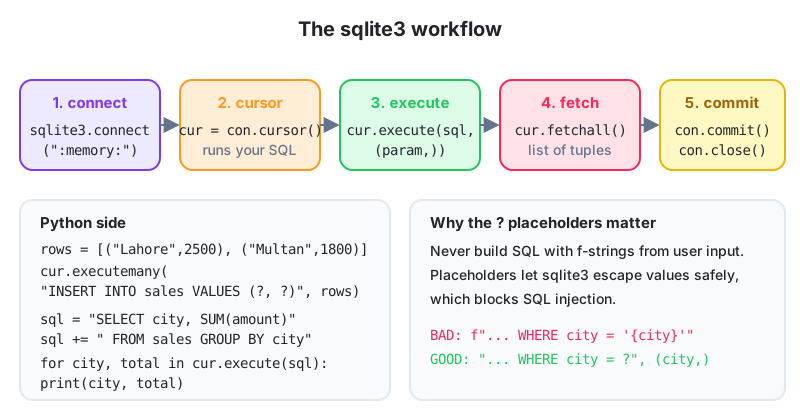
The workflow
import sqlite3

con = sqlite3.connect(":memory:")          # or "sales.db" for a file on disk
cur = con.cursor()

cur.execute("""
CREATE TABLE sales (
    id      INTEGER PRIMARY KEY,
    city    TEXT NOT NULL,
    product TEXT NOT NULL,
    amount  REAL NOT NULL,
    sold_on TEXT NOT NULL
)
""")

rows = [
    ("Lahore",  "Shoes", 2500, "2026-09-01"),
    ("Multan",  "Bag",   1800, "2026-09-01"),
    ("Lahore",  "Shoes", 3200, "2026-09-02"),
    ("Karachi", "Watch", 9100, "2026-09-02"),
    ("Lahore",  "Bag",   1500, "2026-09-03"),
]
cur.executemany("INSERT INTO sales (city, product, amount, sold_on) VALUES (?, ?, ?, ?)", rows)
con.commit()
print(cur.rowcount, "rows inserted")
connect opens (or creates) the database. A cursor runs statements. executemany runs the same statement for each tuple in a list, which is how you bulk-load a CSV. commit saves changes. Until you commit, inserts are invisible to other connections and lost if the program crashes, and "I forgot to commit" explains a good share of the empty-table questions we get.
Querying
cur.execute("SELECT city, SUM(amount) AS total FROM sales GROUP BY city ORDER BY total DESC")
for city, total in cur.fetchall():
    print(f"{city:<8} {total:>8,.0f}")

cur.execute("SELECT COUNT(*) FROM sales WHERE amount > ?", (2000,))
print("Big sales:", cur.fetchone()[0])
fetchall() returns a list of tuples, one per row. fetchone() returns the next row, or None. You can also loop directly over the cursor after execute, which streams rows one at a time for large results.
Parameters, never f-strings
The ? placeholders aren't optional. Build SQL with string formatting and a value like "Lahore'; DROP TABLE sales; --" can wipe your data. Placeholders send values separately, so they're never interpreted as SQL.
city = "Lahore"
cur.execute("SELECT product, amount FROM sales WHERE city = ?", (city,))      # correct
# cur.execute(f"SELECT ... WHERE city = '{city}'")                           # never do this
print(cur.fetchall())

# named placeholders are clearer with several values
cur.execute("SELECT * FROM sales WHERE city = :city AND amount >= :min",
            {"city": "Lahore", "min": 2000})
print(cur.fetchall())
Note the single-element tuple (city,). The comma matters, as it did in Lesson 9.
Rows as dictionaries
con.row_factory = sqlite3.Row
cur = con.cursor()
cur.execute("SELECT * FROM sales WHERE product = ?", ("Shoes",))
for row in cur:
    print(row["city"], row["amount"], dict(row))
Setting row_factory to sqlite3.Row lets you reach columns by name, which reads far better than row[2] and doesn't break when someone reorders the columns.
Update, delete and transactions
cur.execute("UPDATE sales SET amount = amount * 1.1 WHERE city = ?", ("Multan",))
cur.execute("DELETE FROM sales WHERE amount < ?", (1600,))
print("changed:", con.total_changes)
con.commit()

try:
    with con:                                   # a transaction: commits on success, rolls back on error
        cur.execute("INSERT INTO sales (city, product, amount, sold_on) VALUES (?, ?, ?, ?)",
                    ("Quetta", "Bag", 2100, "2026-09-04"))
        cur.execute("INSERT INTO sales (city, product, amount, sold_on) VALUES (?, ?, ?, ?)",
                    ("Quetta", None, 900, "2026-09-04"))   # NOT NULL violated
except sqlite3.IntegrityError as e:
    print("Rolled back:", e)

cur.execute("SELECT COUNT(*) FROM sales WHERE city = 'Quetta'")
print(cur.fetchone()[0])                        # 0: the first insert was undone too
Using the connection as a context manager wraps the block in a transaction, so a batch of related changes either all succeed or none do. That's exactly what you want when posting a payment and updating a balance in the same breath.
Joins across tables
cur.execute("CREATE TABLE cities (name TEXT PRIMARY KEY, province TEXT)")
cur.executemany("INSERT INTO cities VALUES (?, ?)",
                [("Lahore", "Punjab"), ("Multan", "Punjab"), ("Karachi", "Sindh")])

cur.execute("""
SELECT c.province, COUNT(*) AS orders, ROUND(SUM(s.amount)) AS revenue
FROM sales s
JOIN cities c ON c.name = s.city
GROUP BY c.province
ORDER BY revenue DESC
""")
for row in cur:
    print(dict(row))
Everything from the CSA SQL track applies here. Joins, aggregates, subqueries, window functions. SQLite's dialect is close to PostgreSQL for everyday queries, though its type system is looser, so don't rely on it to reject a string in a numeric column.
Loading a CSV into SQLite
import csv, io, sqlite3

csv_text = """city,product,amount,sold_on
Lahore,Shoes,2500,2026-09-01
Multan,Bag,1800,2026-09-01
"""
con = sqlite3.connect(":memory:")
con.execute("CREATE TABLE sales (city TEXT, product TEXT, amount REAL, sold_on TEXT)")
reader = csv.DictReader(io.StringIO(csv_text))          # io.StringIO makes a string act like a file
con.executemany("INSERT INTO sales VALUES (:city, :product, :amount, :sold_on)", reader)
con.commit()
print(con.execute("SELECT SUM(amount) FROM sales").fetchone())
Because DictReader yields dicts with the right keys, you can pass it straight to executemany with named placeholders. Swap io.StringIO(csv_text) for open("sales.csv") for a real file. (con.execute is a shortcut that creates a cursor for you.)
Agent CSVs at a JazzCash regional office: Daily agent transaction files add up to roughly 300,000 rows a month. Loading them into a SQLite file with
executemanytakes a few seconds, and after that a question like "which agents had more than 50 reversals last week" is a single query instead of an Excel pivot that freezes. The file sits on a shared drive with no server to maintain, and the same script will run almost unchanged against PostgreSQL when the office moves to the central warehouse, because the pattern is identical.
Five things to remember
sqlite3is built in.:memory:for practice, a filename for persistence.- connect, cursor,
executeorexecutemany,fetchallorfetchone,commit. - Always pass values with
?or:nameplaceholders, never string formatting. sqlite3.Rowgives column access by name, andwith con:gives transactions.- The same pattern works for PostgreSQL and other databases with a different driver.
Homework
- Create
students(id, name, class, marks)in memory, insert eight rows withexecutemany, and query the average marks per class ordered high to low. - Write
top_products(con, n)that returns the n products with the highest total revenue as a list of dicts, using a parameter forLIMIT. - Insert two related rows inside
with con:, make the second one violate a constraint on purpose, and confirm that neither row was saved.
Lesson 20 of 26
Sign in to track your progress and earn XP for every lesson you finish.
Practice tip: the built-in code runner is being upgraded. Until it is back, copy the examples into any SQL or Python tool you have (for example SQLite, PostgreSQL, MySQL, SQL Server or a free online editor) and run them there. You can keep reading and earning XP here.