
☰ Learn Python Tutorial Menu
JSON and Working with APIs
Written by Faisal Adnan · Updated 26 Sept 2026 · 5 min read
Where does the dollar rate on your company dashboard come from? Somebody's script asks a server for it, and the server answers in JSON, a lightweight text format that looks almost exactly like Python dicts and lists. Payment gateways, courier trackers, weather services, exchange-rate feeds and your own company's internal systems all expose APIs that speak JSON. This lesson shows you how to read and write it, and how to call an API with nothing but the standard library.
What JSON looks like
{
  "order_id": 1041,
  "customer": {"name": "Sana Traders", "city": "Lahore"},
  "items": [
    {"sku": "NB-01", "qty": 3, "price": 250.0},
    {"sku": "PN-07", "qty": 10, "price": 40.0}
  ],
  "paid": true,
  "delivered_on": null
}
Objects in braces become Python dicts, arrays in brackets become lists, and the scalars map as shown below. The only real differences from Python syntax are the lower-case true, false and null, and the rule that keys and strings must use double quotes. Single quotes are the most common reason a hand-written JSON file refuses to load.
| JSON | Python |
|---|---|
object {} | dict |
array [] | list |
| string | str |
| number | int or float |
true / false | True / False |
null | None |
The json module
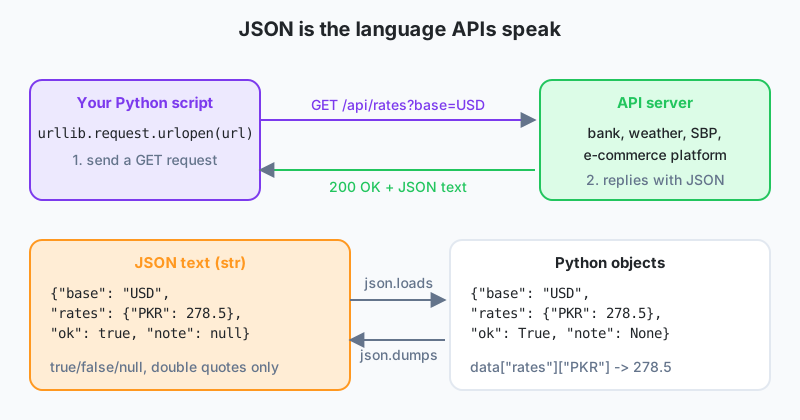
Four functions cover everything. loads and dumps work with strings (the s is for string). load and dump work with files.
import json

text = '{"order_id": 1041, "customer": {"name": "Sana Traders", "city": "Lahore"}, "paid": true, "delivered_on": null}'
order = json.loads(text)                       # str -> Python
print(type(order))                             # <class 'dict'>
print(order["customer"]["city"])               # Lahore
print(order["paid"], order["delivered_on"])    # True None

order["delivered_on"] = "2026-09-25"
print(json.dumps(order))                       # Python -> compact str
print(json.dumps(order, indent=2))             # pretty-printed, for humans
with open("order.json", "w", encoding="utf-8") as f:
    json.dump(order, f, indent=2)

with open("order.json", encoding="utf-8") as f:
    again = json.load(f)
print(again == order)                          # True
json.dumps only understands the types in the table. Pass it a date or a Decimal and you get TypeError. Convert them first with str(d), or pass default=str to dumps.
Working through nested JSON
API responses are often nested several levels deep. Take it one level at a time, and use .get() for keys that might be absent.
response = json.loads('''
{"status": "ok",
 "data": {"base": "USD", "date": "2026-09-24",
          "rates": {"PKR": 278.5, "AED": 3.67, "GBP": 0.79}}}
''')

rates = response["data"]["rates"]
print(f"1 USD = {rates['PKR']} PKR")
print(rates.get("EUR", "not available"))

for code, value in sorted(rates.items()):
    print(f"{code}: {value}")
The triple-quoted string lets the JSON span several lines, which is handy for testing without a network connection. We keep a folder of saved API responses for exactly this purpose, so a class can run when the venue's internet is down.
Calling an API
An API is a URL that returns data instead of a web page. The standard library's urllib.request can fetch it. The playground has no internet access, so run this one locally.
import json
import urllib.request

url = "https://api.exchangerate-api.com/v4/latest/USD"     # example public endpoint
with urllib.request.urlopen(url, timeout=10) as resp:
    payload = json.load(resp)

print(payload["rates"]["PKR"])
Most real APIs want an API key in a header, and many need query parameters. Build the request explicitly.
import json, urllib.request, urllib.parse

params = urllib.parse.urlencode({"city": "Karachi", "days": 3})
req = urllib.request.Request(
    f"https://api.example.com/weather?{params}",
    headers={"Authorization": "Bearer YOUR_KEY", "Accept": "application/json"},
)
try:
    with urllib.request.urlopen(req, timeout=10) as resp:
        data = json.load(resp)
except urllib.error.HTTPError as e:
    print("API error", e.code)
except urllib.error.URLError as e:
    print("Network problem:", e.reason)
Never paste a real key into a script you share. Read it from an environment variable with os.environ["API_KEY"]. We've seen keys committed to public GitHub repos by students more than once, and the provider notices before you do. The third-party requests library makes this code shorter (requests.get(url, params=..., headers=...).json()) and is what most teams use. Install it locally with pip install requests.
Good API manners
- Set a
timeout, so a slow server can't hang your script forever. - Check the status code. Anything other than 200 usually means the body is an error message, not data.
- Respect rate limits, and pause with
time.sleep()between calls in a loop. - Cache responses to a file while developing, so you're not hitting the API on every run.
Worked example, summarising an orders feed
import json

feed = json.loads('''
[{"id": 1, "city": "Lahore", "total": 4500, "status": "delivered"},
 {"id": 2, "city": "Karachi", "total": 12000, "status": "cancelled"},
 {"id": 3, "city": "Lahore", "total": 800, "status": "delivered"},
 {"id": 4, "city": "Multan", "total": 2300, "status": "shipped"}]
''')

delivered = [o for o in feed if o["status"] == "delivered"]
by_city = {}
for o in delivered:
    by_city[o["city"]] = by_city.get(o["city"], 0) + o["total"]

summary = {"count": len(delivered), "revenue": sum(o["total"] for o in delivered), "by_city": by_city}
print(json.dumps(summary, indent=2))
Three hundred parcels nobody checks by hand any more: A Daraz seller in Lahore uses a courier whose tracking API returns JSON per consignment. A nightly script loads the day's tracking numbers from a CSV, calls the API for each one with a one-second pause, and builds a dict of status counts for delivered, in transit and returned. Consignments with
"status": "exception"go intoexceptions.jsonfor the support team, who used to open the courier's website for every parcel.
Keep in mind
- JSON objects become dicts and arrays become lists.
true/false/nullbecomeTrue/False/None. json.loadsanddumpsfor strings,json.loadanddumpfor files,indent=2for readable output.- Walk nested data one level at a time and use
.get()for optional keys. urllib.requestfetches APIs with no installs.requestsis the friendlier local option.- Always set a timeout, handle errors, and keep API keys out of your code.
Exercises
- Convert a list of three employee dicts into a JSON string with
indent=2, save it to a file, and read it back to print the names. - Given the nested exchange-rate JSON above, write
to_pkr(amount, currency)that returns the PKR value and raises a clear error for unknown currencies. - Locally, call any free public JSON API (for example a public holidays or currency API), and print three fields from the response with a fallback message if the request fails.
Lesson 17 of 26
Sign in to track your progress and earn XP for every lesson you finish.
Practice tip: the built-in code runner is being upgraded. Until it is back, copy the examples into any SQL or Python tool you have (for example SQLite, PostgreSQL, MySQL, SQL Server or a free online editor) and run them there. You can keep reading and earning XP here.