
☰ Learn Python Tutorial Menu
Strings and Text Processing
Written by Faisal Adnan · Updated 26 Sept 2026 · 4 min read
Give us one lesson and you'll be able to take a column of names typed by six different data-entry operators and make them match. Half of real data work is text. Customer names in random capitals, phone numbers with dashes, product codes that need splitting, addresses with trailing spaces. Python's string type has dozens of methods built in, and we'll stick to the ones you'll use every week.
Creating strings
A string is text inside single or double quotes. Triple quotes handle text that spans several lines.
name = "Ayesha Khan"
note = 'Customer said "call after 6"'      # single quotes so double quotes can appear inside
address = """House 12, Street 4,
F-8/3, Islamabad"""
print(len(name))                          # 11 characters, spaces included
Strings are immutable. Once created they can't be changed. Every method that looks like it modifies a string actually hands you a new one, so you have to catch it, as in name = name.upper(). Students write name.upper() on its own line, see nothing change, and assume the method is broken. It isn't. The result was thrown away.
Indexing and slicing
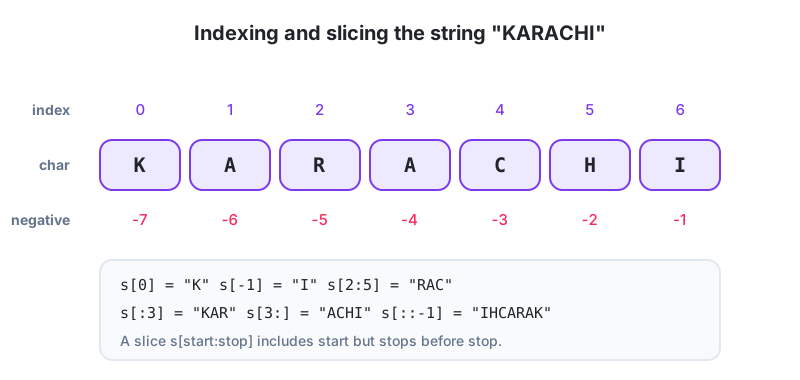
Each character has a position, starting at 0. Negative positions count from the end. A slice s[start:stop] takes characters from start up to but not including stop.
s = "KARACHI"
print(s[0], s[-1])      # K I
print(s[2:5])           # RAC
print(s[:3], s[3:])     # KAR ACHI
print(s[::-1])          # IHCARAK  (reverse)

cnic = "37405-1234567-1"
print(cnic[:5])         # 37405  (the district code)
print(cnic[-1])         # 1      (gender digit)
The methods you'll reach for most
| Method | What it does | Example |
|---|---|---|
.strip() | Remove spaces/newlines at both ends | " Lahore \n".strip() gives "Lahore" |
.lower() / .upper() / .title() | Change case | "ali RAZA".title() gives "Ali Raza" |
.replace(a, b) | Swap every a for b | "0300-1234567".replace("-", "") |
.split(sep) | Break into a list | "a,b,c".split(",") gives ["a","b","c"] |
sep.join(list) | Glue a list into one string | "-".join(["03", "00"]) |
.startswith() / .endswith() | Check prefix/suffix | phone.startswith("03") |
.find(x) | Position of x or -1 | "invoice.pdf".find(".") gives 7 |
.count(x) | How many times x appears | "banana".count("a") gives 3 |
.isdigit() | All characters digits? | "2500".isdigit() is True |
.zfill(n) | Pad with zeros to width n | "42".zfill(5) gives "00042" |
raw = "  AHMED   raza  "
clean = raw.strip().title()
print(clean)                            # "Ahmed   Raza"  (inner spaces remain)
clean = " ".join(raw.split())           # split() with no argument splits on any whitespace
print(clean.title())                    # "Ahmed Raza"
That last trick, " ".join(text.split()), is how we collapse messy spacing into single spaces. Memorise it. You'll type it in your first week of any job.
Membership and joining
email = "bilal.ahmed@example.com.pk"
print("@" in email)                     # True
print(email.endswith(".pk"))            # True
user, domain = email.split("@")
print(user, "|", domain)

label = "Order " + "#" + str(1042)      # str() needed for the number
print(label)
print("-" * 30)                         # repeat a string
Worked example, cleaning phone numbers
Pakistani mobile numbers turn up in every shape. 0300-1234567, +92 300 1234567, 03001234567. Let's push them all into 03001234567.
def clean_phone(raw):
    digits = "".join(ch for ch in raw if ch.isdigit())   # keep only 0-9
    if digits.startswith("92"):
        digits = "0" + digits[2:]
    return digits

for p in ["0300-1234567", "+92 300 1234567", "0300 123 4567", "03001234567"]:
    print(p, "->", clean_phone(p))
All four print 03001234567. The def keyword gets its own lesson (Lesson 11). For now, read it as "a reusable block of code with a name".
Three spellings of one buyer in Faisalabad: A textile exporter we worked with received buyer names from three systems. One stored
"H&M", one stored"h&m "with a trailing space, one stored"H & M". Invoices wouldn't match buyers until the analyst normalised every name with.strip().upper().replace(" ", ""). That one line reconciled most of the mismatches. The rest were genuine typos that needed a human.
Escape characters and raw strings
Inside a string, a backslash starts a special character. \n is a new line, \t is a tab, \" is a literal double quote. When you need backslashes kept as they are, which on Windows means every file path, put an r in front, like r"C:\Users\Ayesha\data.csv". Forgetting the r is the number one reason a Windows path "can't be found".
print("City\tSales")
print("Lahore\t2500")
print("Line one\nLine two")
What to carry forward
- Strings are immutable. Methods return new strings, so assign the result.
- Index from 0, negative from the end, slice with
[start:stop]. strip,lower,replace,splitandjoincover most cleaning work." ".join(text.split())collapses messy whitespace.- Wrap numbers in
str()before joining them to text with+.
Your turn
- Given
code = "LHR-2026-00412", extract the city, the year and the sequence number as three separate variables usingsplit. - Write code that turns
" muhammad USMAN "into"Muhammad Usman". - Given an email address, print
Trueif it belongs to a.edu.pkdomain and contains no spaces, otherwiseFalse.
Lesson 4 of 26
Sign in to track your progress and earn XP for every lesson you finish.
Practice tip: the built-in code runner is being upgraded. Until it is back, copy the examples into any SQL or Python tool you have (for example SQLite, PostgreSQL, MySQL, SQL Server or a free online editor) and run them there. You can keep reading and earning XP here.