
☰ Learn Python Tutorial Menu
Dates and Times
Written by Faisal Adnan · Updated 26 Sept 2026 · 5 min read
Is "01/02/2026" the first of February or the second of January? In Pakistan it's February. To a system built in the US it's January, and we've watched an invoice ageing report go wrong for exactly that reason. Dates look simple and hide traps everywhere. Months have different lengths, you can't subtract two strings, and sorting date text alphabetically gives nonsense. Python's datetime module turns dates into proper objects you can compare, add to and format, and this lesson covers the parts you'll use weekly.
The three main types
| Type | Holds | Example |
|---|---|---|
date | Year, month, day | date(2026, 9, 24) |
datetime | Date plus hour, minute, second | datetime(2026, 9, 24, 14, 30) |
timedelta | A duration | timedelta(days=30) |
from datetime import date, datetime, timedelta

today = date.today()
now = datetime.now()
print(today, now)
print(now.year, now.month, now.day, now.hour)

invoice = date(2026, 9, 1)
print(invoice.weekday())          # 1  (Monday is 0, Sunday is 6)
print(invoice.strftime("%A"))     # Tuesday
Text to date and back
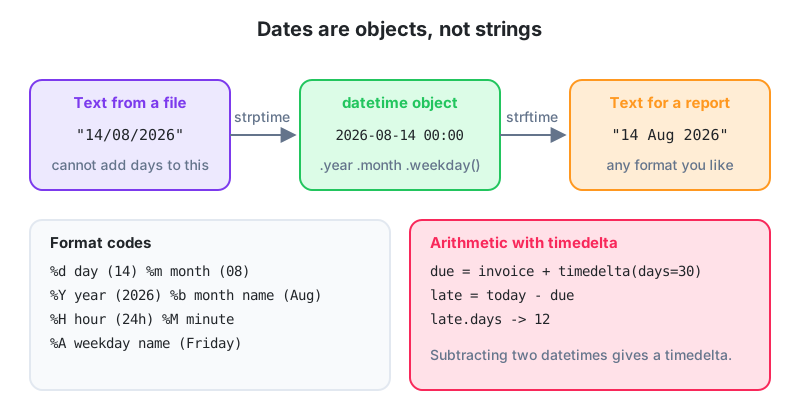
strptime (string parse time) reads text using a format pattern. strftime (string format time) writes text from an object. The format codes are the same in both directions, and yes, everyone mixes the two names up for the first month.
from datetime import datetime

raw = "14/08/2026"
d = datetime.strptime(raw, "%d/%m/%Y")
print(d)                              # 2026-08-14 00:00:00
print(d.strftime("%d %b %Y"))         # 14 Aug 2026
print(d.strftime("%Y-%m-%d"))         # 2026-08-14  (ISO format, sorts correctly as text)
print(d.date())                       # just the date part
| Code | Meaning | Example |
|---|---|---|
%d | Day, two digits | 14 |
%m | Month, two digits | 08 |
%Y / %y | Year four / two digits | 2026 / 26 |
%b / %B | Month short / full name | Aug / August |
%a / %A | Weekday short / full | Fri / Friday |
%H %M %S | Hour (24h), minute, second | 14 30 05 |
%I %p | Hour (12h), AM/PM | 02 PM |
If the text doesn't match the pattern, strptime raises ValueError. When a file mixes formats, try each pattern in turn inside try/except. For ISO strings like "2026-08-14T14:30:00", use datetime.fromisoformat(), which needs no pattern at all.
Arithmetic with timedelta
from datetime import date, timedelta

invoice_date = date(2026, 8, 14)
due = invoice_date + timedelta(days=30)
print("Due:", due)                             # 2026-09-13

today = date(2026, 9, 24)
overdue_by = today - due                       # date minus date gives a timedelta
print(overdue_by.days, "days late")            # 11 days late
print(overdue_by > timedelta(days=7))          # True

start = date(2026, 1, 1)
mondays = [start + timedelta(days=i) for i in range(365) if (start + timedelta(days=i)).weekday() == 0]
print(len(mondays), "Mondays in 2026")
timedelta accepts days, hours, minutes, seconds and weeks, but not months or years, because those vary in length. To move by months, adjust year and month yourself with d.replace(month=...), or install the third-party dateutil package locally. Watch out for the 31st, since replace(month=2) on 31 January raises an error.
Comparing and sorting
Date objects compare naturally with <, > and ==, and lists of them sort correctly. This is the main reason to convert text to dates rather than comparing strings. As text, "14/08/2026" > "02/09/2026" is True because the comparison only looks at the first characters ("1" against "0"), so 14 August wrongly lands after 2 September. Date objects compare by real calendar order.
from datetime import datetime

texts = ["14/08/2026", "02/09/2026", "28/07/2026"]
dates = sorted(datetime.strptime(t, "%d/%m/%Y").date() for t in texts)
print(dates)                                   # earliest first
print(dates[-1] - dates[0])                    # 36 days, 0:00:00
Time zones
By default datetime.now() is "naive", carrying no time zone. That's fine for a local report. When data arrives from an API in UTC, or you combine records from Dubai and Karachi, use aware datetimes.
from datetime import datetime, timezone, timedelta

utc_now = datetime.now(timezone.utc)
pkt = timezone(timedelta(hours=5))             # Pakistan Standard Time, UTC+5
print(utc_now.astimezone(pkt).strftime("%H:%M %Z"))
On Python 3.9 and later you can also use zoneinfo.ZoneInfo("Asia/Karachi"), which knows about historical changes.
Worked example, an ageing report
from datetime import date, datetime

today = date(2026, 9, 24)
invoices = [("INV-201", "2026-06-30", 45000), ("INV-214", "2026-08-20", 12500),
            ("INV-230", "2026-09-15", 78000)]

buckets = {"current": 0, "1-30": 0, "31-60": 0, "60+": 0}
for ref, issued, amount in invoices:
    age = (today - date.fromisoformat(issued)).days
    if age <= 0:
        buckets["current"] += amount
    elif age <= 30:
        buckets["1-30"] += amount
    elif age <= 60:
        buckets["31-60"] += amount
    else:
        buckets["60+"] += amount

for bucket, total in buckets.items():
    print(f"{bucket:<8} Rs {total:>10,}")
Letters of credit in Faisalabad: A textile exporter tracks LCs that expire 90 days after shipment. The old spreadsheet held dates as text in three different formats, so the "days to expiry" column was often blank or negative and nobody trusted it. A Python script parses each format with a short list of
strptimepatterns, computesexpiry = shipped + timedelta(days=90), and emails a list of LCs expiring within 14 days every Monday morning. It caught two close calls in its first month.
The one rule
Do date logic on date, datetime and timedelta objects, never on strings. Parse with strptime(text, pattern), format with strftime(pattern), and remember the codes are shared. Adding a timedelta moves a date and subtracting two dates gives a timedelta with .days. Date objects compare and sort correctly, and so does ISO text (YYYY-MM-DD), which is why we store dates that way. Use aware datetimes when data crosses time zones.
Homework
- Parse
"24-09-2026 14:30"into a datetime, add 45 minutes, and print the result as02:15 PM on Thursdaystyle text. - Given a list of dates as
"dd/mm/yyyy"strings, count how many fall on a weekend. - Write
days_until_eid(today)that returns the number of days from a given date to 2027-03-20, and print a message if it is under 30.
Lesson 16 of 26
Sign in to track your progress and earn XP for every lesson you finish.
Practice tip: the built-in code runner is being upgraded. Until it is back, copy the examples into any SQL or Python tool you have (for example SQLite, PostgreSQL, MySQL, SQL Server or a free online editor) and run them there. You can keep reading and earning XP here.