
☰ Learn Python Tutorial Menu
Numbers and Operators
Written by Faisal Adnan · Updated 26 Sept 2026 · 5 min read
How much of analytics is just arithmetic? Honestly, most of it. Totals, percentages, averages, growth rates, tax. Python covers nearly all of that with a handful of operators, and this lesson goes through them along with the two number types and the rounding rules that catch people out the moment money is involved.
Arithmetic operators
| Operator | Meaning | Example | Result |
|---|---|---|---|
+ | Add | 1200 + 300 | 1500 |
- | Subtract | 1200 - 300 | 900 |
* | Multiply | 12 * 38500 | 462000 |
/ | Divide (always float) | 10 / 4 | 2.5 |
// | Floor divide (whole part) | 10 // 4 | 2 |
% | Modulo (remainder) | 10 % 4 | 2 |
** | Power | 2 ** 10 | 1024 |
Two of these deserve a second look. / always returns a float, even for 10 / 5 (you get 2.0, and yes, that surprises people in the first week). % looks obscure but we use it constantly. Is a number even? n % 2 == 0. Split 135 minutes into hours and minutes? 135 // 60 and 135 % 60. Do something on every 100th row? Modulo again.
Order of operations
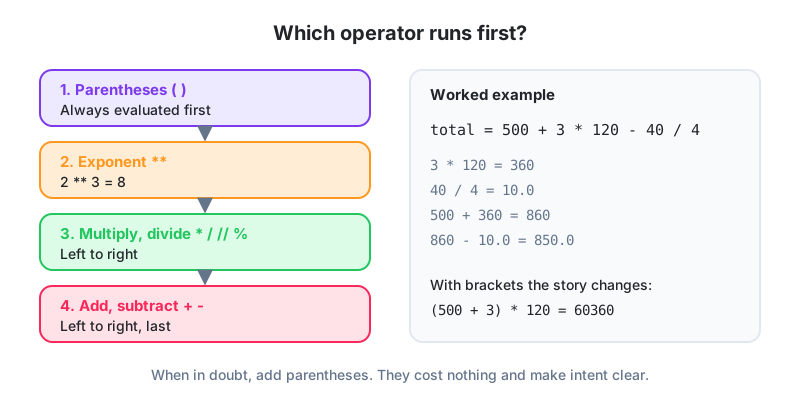
Python follows the maths you learned at school. Parentheses first, then **, then * / // %, then + -. When in doubt, add parentheses. They cost nothing and the next person reading your script will thank you.
subtotal = 500 + 3 * 120 - 40 / 4
print(subtotal)                     # 850.0

gross = (500 + 3 * 120) * 1.17      # GST applied to the whole subtotal
print(gross)                        # 1006.2
int and float
Integers in Python have no size limit, so 2 ** 200 just works. Floats are 64-bit decimals and, as in every language, they're approximations.
print(0.1 + 0.2)              # 0.30000000000000004
print(0.1 + 0.2 == 0.3)       # False
That's not a Python bug. A binary computer can't store 0.1 exactly, the same way you can't write one third exactly in decimal. For reports, round when you display, so round(0.1 + 0.2, 2) gives 0.3. For accounting, where every paisa has to balance, use the decimal module.
from decimal import Decimal

price = Decimal("1250.75")
qty = 3
print(price * qty)            # 3752.25 exactly
Mix an int with a float and you get a float, so 3 * 1.5 is 4.5. Floor division of two ints with // stays an int.
Built-ins worth memorising
print(abs(-450))              # 450
print(round(3.14159, 2))      # 3.14
print(round(2.5), round(3.5)) # 2 4  (banker's rounding: ties go to even)
print(max(120, 95, 140))      # 140
print(min(120, 95, 140))      # 95
print(pow(2, 8))              # 256
print(divmod(135, 60))        # (2, 15)  hours and minutes together
Look at that round(2.5) line again. Python rounds ties to the nearest even number, which is not what your school teacher or your accountant does. If a client's finance team expects 2.5 to become 3, use Decimal with ROUND_HALF_UP. We learned that one the hard way on a payroll reconciliation. For square roots, logs and constants, import math and use math.sqrt(16), math.ceil(4.1) or math.pi.
Shorthand assignment
Updating a running total is so common that Python has compact forms for it.
total = 0
total += 2500      # same as total = total + 2500
total += 1800
total -= 300       # a refund
print(total)       # 4000

count = 10
count *= 2         # 20
count //= 3        # 6
Comparison and logical operators
Comparisons produce a bool. Logical operators combine them. Every rule you write in Lesson 6 is built from these.
| Operator | Meaning | Example |
|---|---|---|
== / != | Equal / not equal | status == "paid" |
< > <= >= | Less / greater than | balance >= 500 |
and | Both must be true | age >= 18 and has_cnic |
or | Either is true | city == "Lahore" or city == "Multan" |
not | Flip | not is_overdue |
balance = 750
is_active = True
print(balance > 500 and is_active)     # True
print(balance > 1000 or is_active)     # True
print(not is_active)                   # False
print(100 <= balance <= 1000)          # True  (chained comparison)
Typing = when you meant == is the classic slip. Python usually raises a SyntaxError and saves you.
The JazzCash fee that came out 100 times too high: A merchant in Rawalpindi pays 1.5% per transaction plus a fixed Rs 5. An analyst computing monthly fees wrote
fee = amount * 1.5 + 5, because 1.5% is0.015, not1.5. The corrected line isfee = amount * 0.015 + 5. The report also rounds each fee withround(fee, 2)before summing, so the total matches the bank statement to the paisa. Round per line, not once at the end, or the totals drift.
Worked example, percentage change
last_month = 412000
this_month = 478500

change = this_month - last_month
percent = change / last_month * 100
print("Growth:", round(percent, 1), "%")     # Growth: 16.1 %

share_of_target = this_month / 500000
print("Target reached:", share_of_target >= 1.0)   # False
If you remember one thing
Floats are approximate, so round for display and reach for Decimal when it's money that has to reconcile. Beyond that, / always gives a float, // and % give quotient and remainder, parentheses beat memorised precedence, += updates in place, and comparisons return True or False that you combine with and, or and not.
Three things to try
- A Karachi shop sells an item for Rs 4,500 with 17% GST included. Compute the price before tax and the tax amount, rounded to 2 decimals.
- Convert 1,000 minutes into hours and minutes using
//and%(ordivmod). - Write a comparison that is
Trueonly whensalaryis between 50,000 and 150,000 inclusive anddepartmentis not"Interns".
Lesson 3 of 26
Sign in to track your progress and earn XP for every lesson you finish.
Practice tip: the built-in code runner is being upgraded. Until it is back, copy the examples into any SQL or Python tool you have (for example SQLite, PostgreSQL, MySQL, SQL Server or a free online editor) and run them there. You can keep reading and earning XP here.