
☰ Learn Python Tutorial Menu
Loops: for and while
Written by Faisal Adnan · Updated 26 Sept 2026 · 5 min read
How many rows did your last Excel file have? Two thousand? Fifty thousand? A script that handles one record is a toy. Loops are what turn twenty lines of logic into something that processes every row, every file and every month without you touching it. Python has two of them. for walks through a collection, while repeats as long as a condition holds. Get comfortable with both and there's very little repetitive work you can't automate.
Step 1: the for loop
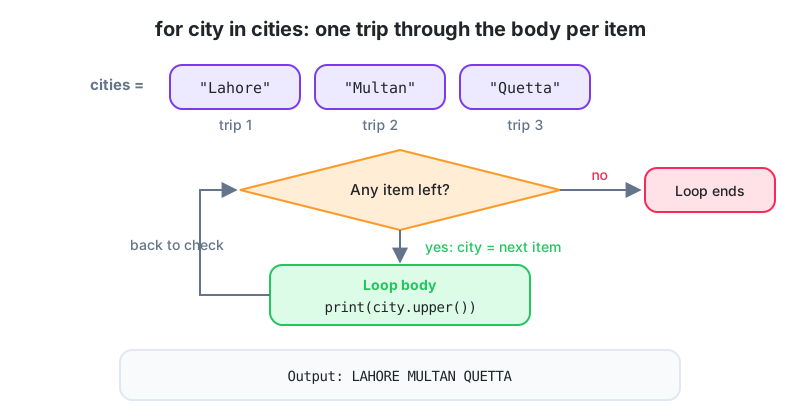
cities = ["Lahore", "Multan", "Quetta"]

for city in cities:
    print(city.upper())
print("Done")
Read it aloud as "for each city in cities". On every pass, city is set to the next item and the indented body runs. When the list runs out, the loop ends and execution carries on below. You can loop over strings (character by character), lists, tuples, dictionaries, files, and anything else that's iterable.
Step 2: range, for looping a number of times
for i in range(5):
    print(i, end=" ")        # 0 1 2 3 4
print()

for year in range(2022, 2027):
    print(year, end=" ")     # 2022 2023 2024 2025 2026
print()

for n in range(10, 0, -2):
    print(n, end=" ")        # 10 8 6 4 2
range(stop) starts at 0 and stops before stop. range(start, stop, step) gives full control. Because it stops before the end value, range(1, 13) gives you the twelve months, not thirteen. Off-by-one errors here are so common that we make students say "up to but not including" out loud.
Step 3: accumulating a result
The pattern you'll write most often goes like this. Create an empty total (or list) before the loop, update it inside, use it afterwards.
daily_sales = [12500, 9800, 15200, 7600, 18900]

total = 0
best = 0
for amount in daily_sales:
    total += amount
    if amount > best:
        best = amount

print(f"Total: {total:,}  Best day: {best:,}  Average: {total / len(daily_sales):,.0f}")
Yes, sum() and max() exist for exactly this. Learn the pattern anyway, because most real logic isn't a plain sum. It's "add it up, but only for Lahore, and only if the invoice is paid".
Step 4: enumerate and zip
products = ["Notebook", "Pen", "Marker"]
prices = [250, 40, 120]

for index, name in enumerate(products, start=1):
    print(f"{index}. {name}")

for name, price in zip(products, prices):
    print(f"{name:<10} Rs {price}")
enumerate hands you a counter alongside each item, so you never need range(len(x)). zip walks two or more lists side by side.
Step 5: the while loop
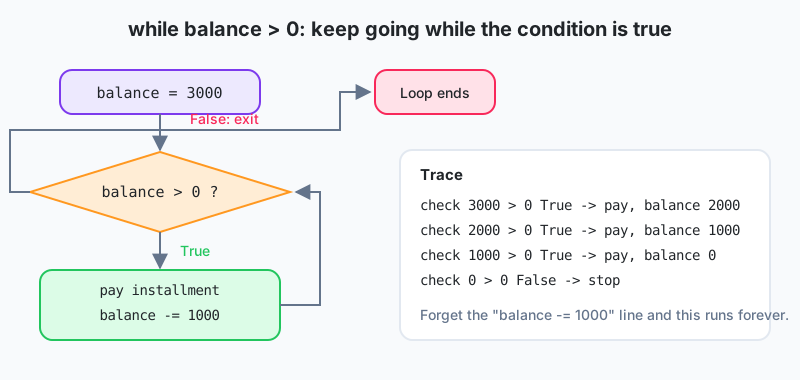
Use while when you can't know in advance how many passes you need. Read until a sentinel value, retry until a request succeeds, keep paying until a balance hits zero.
balance = 3000
installment = 1000
month = 0

while balance > 0:
    month += 1
    balance -= installment
    print(f"Month {month}: remaining {balance}")
The body has to change something the condition depends on, or the loop never ends. If the playground looks frozen, you've probably written an infinite loop. Check that the condition can actually become false.
Step 6: break and continue
transactions = [2500, 1800, -1, 4100, 900]     # -1 marks end of data

for t in transactions:
    if t == -1:
        break                # leave the loop completely
    if t < 1000:
        continue             # skip the rest of this trip, go to next item
    print("Processing", t)
# Processing 2500
# Processing 1800
break leaves the loop immediately. continue jumps to the next pass. Both work in for and while. A while True: loop with a break inside is the standard way to write "keep going until something happens".
Step 7: nested loops
branches = ["Gulberg", "DHA"]
quarters = ["Q1", "Q2"]

for branch in branches:
    for q in quarters:
        print(branch, q)
Nested loops multiply. Two branches times two quarters is four lines, fine. Ten thousand customers times ten thousand products is a hundred million passes, and your laptop fan will tell you about it. Dictionaries (Lesson 10) usually replace an inner loop with a direct lookup.
Worked example, a running balance with alerts
opening = 50000
movements = [("Deposit", 20000), ("Withdraw", 45000), ("Withdraw", 30000), ("Deposit", 12000)]

balance = opening
for kind, amount in movements:
    if kind == "Deposit":
        balance += amount
    else:
        balance -= amount
    flag = "  <-- LOW" if balance < 5000 else ""
    print(f"{kind:<9} {amount:>8,}  balance {balance:>8,}{flag}")
3,200 SKUs and a nightly stock file: A Daraz seller in Lahore we worked with gets a stock export every night. A
forloop over the rows compares stock to a reorder level and collects the SKUs that need ordering, withcontinueskipping discontinued items. The check runs in under a second and replaced a two-hour manual filter in Excel. Later the seller wrapped the download in awhileloop that retries three times when the file server is slow, which it often is after 11 pm.
If you only remember three lines
for item in collection: handles each item in turn. while condition: repeats until the condition goes false, so make sure it can. And total = 0 before the loop, total += x inside it. The rest (range, enumerate, zip, break, continue) you'll pick up by using them.
Three things to try
- Print the 7-times table from 1 to 12 as
7 x 1 = 7lines usingrange. - Given a list of monthly sales, use a loop to find the first month (1-based) in which cumulative sales crossed Rs 1,000,000, and stop as soon as you find it.
- Simulate a savings account: start with Rs 10,000, add 8% profit each year, and use a
whileloop to count how many years it takes to reach Rs 20,000.
Lesson 7 of 26
Sign in to track your progress and earn XP for every lesson you finish.
Practice tip: the built-in code runner is being upgraded. Until it is back, copy the examples into any SQL or Python tool you have (for example SQLite, PostgreSQL, MySQL, SQL Server or a free online editor) and run them there. You can keep reading and earning XP here.