
☰ Learn Python Tutorial Menu
Clean Code, Virtual Environments and Debugging
Written by Faisal Adnan · Updated 26 Sept 2026 · 6 min read
Will your script run on someone else's laptop? Will you understand it yourself in three months? Working code isn't the finish line. Code a colleague can read, run on a fresh machine and fix when it breaks is what turns a script from a liability into an asset, and it's what separates the candidates who get hired after our course from the ones who don't. This lesson collects those habits. Readable style, isolated environments, and a repeatable way to hunt down bugs.
Readable code, or PEP 8 on one page
PEP 8 is Python's official style guide. You don't need to memorise it. Follow these points and let an auto-formatter do the rest.
| Rule | Do | Avoid |
|---|---|---|
| Names | monthly_revenue, class InvoiceLine, GST_RATE | mr, invoiceline, gstRate |
| Indentation | 4 spaces | Tabs, 2 spaces |
| Line length | Up to 88 or 99 characters | Lines you must scroll |
| Spacing | total = a + b, f(x, y) | total=a+b, f(x,y) |
| Imports | Top of file, standard library first, one per line | Inside functions, import * |
| Comparisons | if not rows:, if x is None: | if len(rows) == 0:, if x == None: |
| Comments | Explain why | Restate what the code obviously does |
# Before
def f(d,r):
    t=0
    for x in d:
        if x[2]>r: t=t+x[2]
    return t

# After
def total_above(rows: list[tuple], threshold: float) -> float:
    """Sum the amount (third field) of every row above the threshold."""
    return sum(amount for _, _, amount in rows if amount > threshold)
Install black (formatter) and ruff (linter) locally with pip install black ruff, then run black report.py and ruff check report.py. They fix spacing and catch unused variables, undefined names and other slips before you run anything. We run both on every file in our own projects and have stopped arguing about formatting entirely.
Structure of a good script
"""Daily sales summary for the Lahore branch.

Reads exports/sales_YYYY-MM-DD.csv and writes summary_YYYY-MM-DD.txt.
"""
import csv
from datetime import date
from pathlib import Path

EXPORT_DIR = Path("exports")
BIG_ORDER = 20_000                       # underscores make large numbers readable


def load_rows(path: Path) -> list[dict]:
    with path.open(newline="", encoding="utf-8") as f:
        return list(csv.DictReader(f))


def summarise(rows: list[dict]) -> dict:
    amounts = [float(r["amount"]) for r in rows]
    return {"orders": len(rows), "revenue": sum(amounts),
            "big_orders": sum(a > BIG_ORDER for a in amounts)}


def main() -> None:
    today = date.today().isoformat()
    rows = load_rows(EXPORT_DIR / f"sales_{today}.csv")
    for key, value in summarise(rows).items():
        print(f"{key}: {value}")


if __name__ == "__main__":
    main()
Docstring at the top, then imports, constants, small functions with one job each, and a main() that reads like a summary. Anyone can tell what the script does in ten seconds, which is the test we apply when marking capstone projects.
Virtual environments
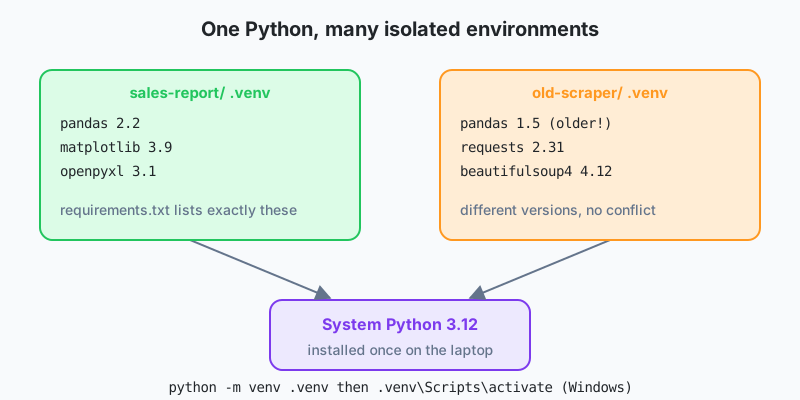
Different projects need different package versions. Install everything globally and one day an upgrade for project A breaks project B. A virtual environment is a private folder of packages for one project.
# create (once per project), inside the project folder
python -m venv .venv

# activate (every time you open a terminal)
.venv\Scripts\activate          # Windows
source .venv/bin/activate        # macOS / Linux

# install what the project needs
pip install pandas matplotlib

# record exact versions so others can reproduce your setup
pip freeze > requirements.txt

# on another machine
pip install -r requirements.txt
Add .venv/ to .gitignore and commit requirements.txt instead. When the prompt shows (.venv), python and pip point at the environment. Tools such as uv and poetry automate this further, but venv ships with Python and is enough to start.
Debugging
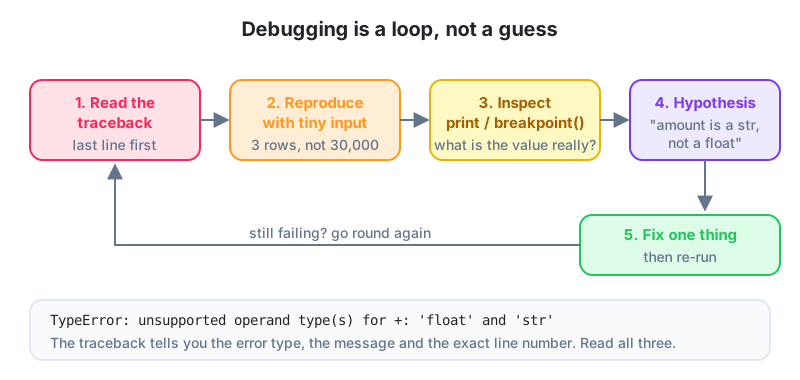
1. Read the traceback properly
Traceback (most recent call last):
  File "report.py", line 31, in <module>
    main()
  File "report.py", line 27, in main
    rows = load_rows(EXPORT_DIR / f"sales_{today}.csv")
  File "report.py", line 14, in load_rows
    with path.open(newline="", encoding="utf-8") as f:
FileNotFoundError: [Errno 2] No such file or directory: 'exports/sales_2026-09-24.csv'
The bottom line gives the error type and message. Above it sits the chain of calls, innermost last. Here the fix is obvious (today's file doesn't exist yet), but the habit of reading bottom-up applies to every error you'll ever see.
2. Shrink the input
If a script fails on row 48,213 of a file, copy that row and two neighbours into a tiny test file. Bugs are found by narrowing, not by staring.
3. Look at real values
for row in rows:
    print(f"{row=}")                         # quick look, remove afterwards
    amount = float(row["amount"])
For anything beyond a quick look, put breakpoint() on the line before the failure. Python pauses there in the debugger. Type a variable name to see it, n for next line, c to continue, q to quit. Editors like VS Code offer the same with a click in the line margin.
4. Use logging instead of print in real scripts
import logging

logging.basicConfig(level=logging.INFO, format="%(asctime)s %(levelname)s %(message)s")
log = logging.getLogger(__name__)

log.info("Loaded %d rows", len(rows))
log.warning("Skipped row with bad amount: %s", row)
Logging can be switched off, sent to a file and timestamped, none of which print can do. A scheduled script should log to a file, so you can see what happened at 2 am without being awake at 2 am.
5. Write a small test
def test_summarise():
    rows = [{"amount": "100"}, {"amount": "30000"}]
    result = summarise(rows)
    assert result["orders"] == 2
    assert result["big_orders"] == 1

test_summarise()
print("ok")
An assert that fails raises AssertionError. Save tests in test_report.py, run them with pytest (pip install pytest), and every future change gets checked in seconds. Tests are the difference between "I think it still works" and "it works".
Common bugs and their fingerprints
| Symptom | Likely cause |
|---|---|
Result is None | Function missing return, or x = list.sort() |
| Totals wildly too large | Adding strings ("2500" + "1800") |
| Loop runs once or never | Wrong indentation, or iterating a generator twice |
| Changes appear in another list | Aliasing; missing .copy() |
KeyError on a column that exists | Trailing space or case in the header, e.g. "Amount " |
| Works on your PC, fails on the server | Missing package (no requirements.txt) or hard-coded path |
Right on the laptop, wrong on the server: A JazzCash analytics intern's report was correct on her machine and wrong on the shared server. The server had an older pandas where a default argument differed. Pinning versions in
requirements.txtand creating a virtual environment on the server fixed it. She also added a three-line test that checks a known day's total, which now runs before every scheduled execution and has caught two data-format changes since.
Habits to keep
- Follow PEP 8 with descriptive names, small functions and a
main(), and letblackandruffenforce it. - One virtual environment per project, with packages pinned in
requirements.txt. - Read tracebacks bottom-up, shrink the failing input, and inspect real values with
{x=}orbreakpoint(). - Use
loggingin scheduled scripts and write smallasserttests for core functions. - Most "mysterious" bugs are types, aliasing, indentation or environment differences.
These habits are also most of what the practical assessment for the CSA certification looks for. Clean structure, a requirements file and one test will put you ahead of most submissions.
Do these this week
- Take any script you wrote earlier in this track and restructure it into functions with a
main()guard, type hints and a module docstring. - Locally, create a virtual environment, install pandas, freeze requirements, delete the environment, and recreate it from the file.
- Introduce a deliberate bug (a string amount) into
summarise(), run the test, read the traceback, and fix it usingbreakpoint()at least once.
Lesson 25 of 26
Sign in to track your progress and earn XP for every lesson you finish.
Practice tip: the built-in code runner is being upgraded. Until it is back, copy the examples into any SQL or Python tool you have (for example SQLite, PostgreSQL, MySQL, SQL Server or a free online editor) and run them there. You can keep reading and earning XP here.