
☰ Learn Python Tutorial Menu
Dictionaries
Written by Faisal Adnan · Updated 26 Sept 2026 · 4 min read
After this lesson you'll use dictionaries in nearly every script you write. That's not an exaggeration. If lists are Python's rows, dictionaries are its lookups. A dictionary maps a key to a value, the way your phone maps a name to a number, and analysts lean on them for counting, grouping, configuration and representing one record with named fields.
Creating and reading a dictionary
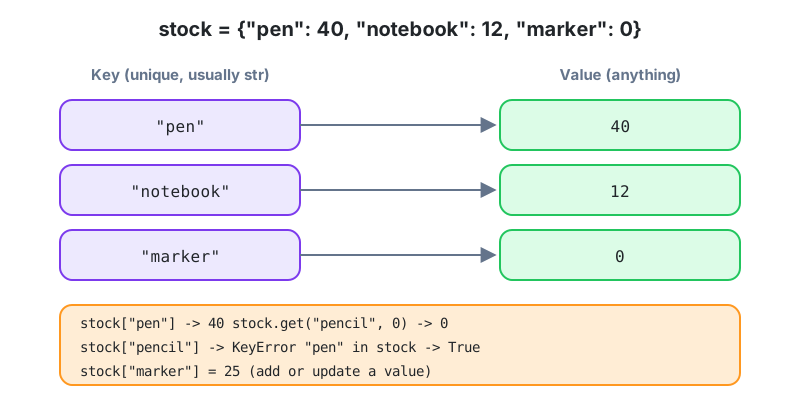
stock = {"pen": 40, "notebook": 12, "marker": 0}

print(stock["pen"])              # 40
print(len(stock))                # 3
print("marker" in stock)         # True  (checks keys, not values)

stock["marker"] = 25             # update
stock["stapler"] = 6             # add a new key
del stock["pen"]                 # remove
print(stock)
Keys are usually strings, but any immutable value works. Numbers, tuples, even booleans. Values can be anything at all, including lists and other dictionaries. Each key appears once, and assigning to an existing key replaces its value.
Missing keys
stock["pencil"] raises KeyError when the key isn't there. You have two safer options.
print(stock.get("pencil"))          # None
print(stock.get("pencil", 0))       # 0  (your own default)

count = stock.setdefault("pencil", 0)   # inserts pencil: 0 if missing, returns the value
Looping over a dictionary
prices = {"Notebook": 250, "Pen": 40, "Marker": 120}

for item in prices:                    # keys
    print(item)

for item, price in prices.items():     # keys and values together (most useful)
    print(f"{item:<10} Rs {price}")

print(list(prices.values()))           # [250, 40, 120]
print(sum(prices.values()))            # 410
Since Python 3.7 a dictionary remembers the order keys were inserted, so the output is predictable. Older tutorials that warn "dicts have no order" are describing a Python you'll never run.
Counting with a dictionary
This is the dictionary pattern you'll write more than any other in data work.
orders = ["Lahore", "Karachi", "Lahore", "Multan", "Lahore", "Karachi"]

counts = {}
for city in orders:
    counts[city] = counts.get(city, 0) + 1

print(counts)          # {'Lahore': 3, 'Karachi': 2, 'Multan': 1}
Read the key line as "take the current count for this city, zero if none yet, and add one". Lesson 21 introduces collections.Counter, which does this in one call. We still make everyone write the manual version first, because the interviewer in Karachi who asks you to count word frequencies on a whiteboard won't accept "I'd import Counter".
Grouping with a dictionary of lists
rows = [("Lahore", 2500), ("Multan", 1800), ("Lahore", 1200), ("Karachi", 4100)]

by_city = {}
for city, amount in rows:
    if city not in by_city:
        by_city[city] = []
    by_city[city].append(amount)

print(by_city)         # {'Lahore': [2500, 1200], 'Multan': [1800], 'Karachi': [4100]}

for city, amounts in by_city.items():
    print(city, sum(amounts))
A dictionary as a record
A dict with fixed keys is a natural way to hold one row with named fields. It's exactly what csv.DictReader (Lesson 15) and JSON (Lesson 17) hand you.
employee = {
    "name": "Hira Baig",
    "department": "Analytics",
    "salary": 145000,
    "skills": ["SQL", "Python"],
    "manager": None,
}
print(employee["name"], "earns", employee["salary"])
employee["skills"].append("Power BI")
print(employee["skills"])

staff = [employee, {"name": "Ali Raza", "department": "Sales", "salary": 90000, "skills": [], "manager": "Hira Baig"}]
total_payroll = sum(person["salary"] for person in staff)
print(total_payroll)     # 235000
Nested dictionaries
branches = {
    "Gulberg": {"manager": "Ayesha", "staff": 14, "sales": 412000},
    "DHA":     {"manager": "Usman",  "staff": 9,  "sales": 388000},
}
print(branches["DHA"]["manager"])                   # Usman
for name, info in branches.items():
    print(f"{name}: Rs {info['sales'] / info['staff']:,.0f} per staff member")
Methods at a glance
| Method | Purpose |
|---|---|
d.keys(), d.values(), d.items() | Views for looping |
d.get(k, default) | Safe lookup |
d.pop(k) | Remove and return a value |
d.update(other) | Merge another dict in |
d.copy() | Shallow copy (same aliasing trap as lists) |
dict(zip(keys, values)) | Build from two lists |
sorted(d.items(), key=lambda kv: kv[1]) | Sort by value |
Replacing a twelve-branch if chain at K-Electric: The billing team needs a tariff for each customer category. Instead of an
if/elifchain with a dozen branches, the analyst keepstariffs = {"residential": 23.5, "commercial": 31.0, "industrial": 28.2}and writesrate = tariffs[category]. When the regulator changes a rate, one line of the dictionary changes and nothing else moves. And when a category turns up that isn't in the dictionary, theKeyErroris a useful alarm rather than a silently wrong bill. Don't reach for.get()with a default there. You want that crash.
The pattern to memorise
counts[key] = counts.get(key, 0) + 1. Everything else in this lesson follows from it. A dict maps unique, immutable keys to any values and lookup is instant, .get(key, default) avoids KeyError when a key might be missing, .items() gives you key and value together in a loop, a dict with fixed keys is one record, and a list of dicts is a table.
Homework
- Given a list of product names sold today (with repeats), build a dict of counts and print the three best sellers in order.
- Build a dict that maps each department to a list of employee names from a list of
(name, department)tuples, then print each department with its head count. - Create a nested dict of three cities, each with
populationandprovince. Print the total population per province.
Lesson 10 of 26
Sign in to track your progress and earn XP for every lesson you finish.
Practice tip: the built-in code runner is being upgraded. Until it is back, copy the examples into any SQL or Python tool you have (for example SQLite, PostgreSQL, MySQL, SQL Server or a free online editor) and run them there. You can keep reading and earning XP here.