
☰ Learn Python Tutorial Menu
Errors and Exceptions
Written by Faisal Adnan · Updated 26 Sept 2026 · 5 min read
What happens to your nightly report when row 812,455 has the word "PENDING" in the amount column? If the answer is "the script crashes at 2 am and nobody finds out until 9", you have a problem that this lesson solves. Real data is messy. A blank amount, an API that times out, a missing file, a user typing "abc" where a number belongs. Python's exception system lets you notice a problem, respond sensibly, and either carry on or stop loudly on purpose. The mechanics are easy. The judgement about when to catch and when not to is the real skill.
What an exception is
When Python can't continue, it raises an exception, an object describing what went wrong. If nothing handles it, the program stops and prints a traceback.
Traceback (most recent call last):
  File "report.py", line 12, in <module>
    amount = int(row["amount"])
ValueError: invalid literal for int() with base 10: 'N/A'
Read the last line first, which gives the exception type (ValueError) and message. The line above it says where. These are the ones you'll meet most.
| Exception | Typical cause |
|---|---|
ValueError | Right type, bad value: int("abc") |
TypeError | Wrong type: "Rs" + 500 |
KeyError | Dict key missing |
IndexError | List index out of range |
ZeroDivisionError | Dividing by zero, e.g. average of an empty list |
FileNotFoundError | Path is wrong or file absent |
AttributeError | Calling a method that does not exist, often on None |
try / except
raw_values = ["2500", "N/A", "1800", "", "4100"]

total = 0
skipped = 0
for text in raw_values:
    try:
        total += int(text)
    except ValueError:
        skipped += 1

print(f"Total {total}, skipped {skipped}")     # Total 8400, skipped 2
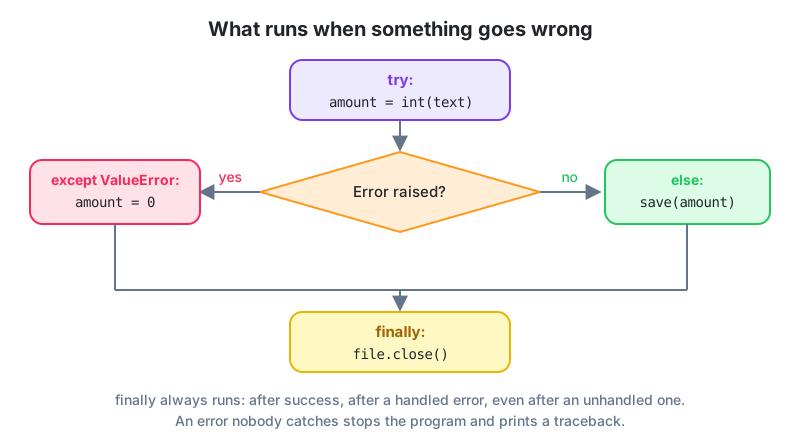
Code in the try block runs normally. If it raises the named exception, Python jumps to the except block instead of crashing, then carries on after the whole statement. Catch the specific exception you expect. A bare except: also swallows typos, Ctrl+C and the bugs you actually want to hear about. We reject homework that uses it.
Using the exception object
try:
    rate = float("17%")
except ValueError as err:
    print("Could not parse rate:", err)
Several exception types
def safe_average(values):
    try:
        return sum(values) / len(values)
    except ZeroDivisionError:
        return 0.0
    except TypeError:
        print("Non-numeric value found")
        return None

print(safe_average([10, 20, 30]))     # 20.0
print(safe_average([]))               # 0.0
print(safe_average([10, "x"]))        # message, then None
You can also group types with except (ValueError, TypeError):.
else and finally
def read_config(path):
    try:
        f = open(path)
    except FileNotFoundError:
        print("No config, using defaults")
        return {}
    else:
        data = f.read()          # runs only if open() succeeded
        f.close()
        return {"raw": data}
    finally:
        print("read_config finished")   # runs no matter what
else holds the code that should run only when nothing went wrong, which keeps the try block small. finally always runs and is for cleanup such as closing files or database connections (though with, coming in Lesson 15, usually does that for you).
Raising your own
Sometimes the right response to bad data is to stop, loudly. raise creates an exception on purpose.
def apply_discount(price, percent):
    if not 0 <= percent <= 100:
        raise ValueError(f"percent must be 0-100, got {percent}")
    return price * (1 - percent / 100)

print(apply_discount(1000, 15))     # 850.0
print(apply_discount(1000, 150))    # ValueError with a clear message
Failing early with a precise message beats quietly producing a negative price that surfaces three reports later.
Custom exception classes
class InsufficientFunds(Exception):
    pass

def withdraw(balance, amount):
    if amount > balance:
        raise InsufficientFunds(f"balance {balance}, requested {amount}")
    return balance - amount

try:
    withdraw(500, 800)
except InsufficientFunds as e:
    print("Declined:", e)
When to catch, and when not to
| Situation | Do |
|---|---|
| One bad row in a file of thousands | Catch, count it, log it, continue |
| A network call that may time out | Catch, retry a few times, then give up |
| A bug in your own logic | Do not catch; let it crash so you see it |
| Config file missing | Catch and use defaults, or raise with a helpful message |
| Impossible input to your function | raise ValueError with a clear message |
Python people say "ask forgiveness, not permission". try: x = d[key] except KeyError: is considered more Pythonic than checking if key in d first, at least when the missing case is rare.
The 2 am crash at a Karachi bank: The nightly reconciliation died because one row out of well over a million had "PENDING" where an amount should be, and nobody saw the traceback until the morning shift. The rewrite wraps the per-row conversion in
try/except ValueError, appends the bad row to anerrorslist, and finishes the run. Then it raises its ownReconciliationErrorif more than a tiny fraction of rows failed. A genuine data problem still stops the pipeline. One stray value doesn't.
Keep these five
- Exceptions describe what went wrong. Read the last traceback line first.
try/except SpecificErrorhandles expected problems. Never use a bareexcept:.elseruns on success,finallyalways runs.raise ValueError("clear message")stops bad input early.- Catch what you can handle sensibly. Let real bugs crash.
Homework
- Write
to_float(text)that returns a float for inputs like"2,500.50"and"Rs 800", and returnsNonefor anything unparseable, without ever crashing. - Given a dict of exchange rates, write a function that converts an amount to PKR and raises a
KeyErrorwith a helpful message listing the supported currencies when the currency is unknown. - Create a
NegativeStockErrorclass and use it in asell(stock, qty)function; catch it in a loop over several sales and print which ones were rejected.
Lesson 13 of 26
Sign in to track your progress and earn XP for every lesson you finish.
Practice tip: the built-in code runner is being upgraded. Until it is back, copy the examples into any SQL or Python tool you have (for example SQLite, PostgreSQL, MySQL, SQL Server or a free online editor) and run them there. You can keep reading and earning XP here.