
☰ Learn Python Tutorial Menu
Input, Output and f-strings
Written by Faisal Adnan · Updated 26 Sept 2026 · 4 min read
Picture the email. Your manager asked for a sales summary, and what you sent shows 1289000.0 next to 412500.5 with nothing lined up. The numbers are right. Nobody will read them. This lesson is about the last mile of a script, which is showing results a person can scan in two seconds. We'll cover print properly, reading input, and f-strings, and by the end you'll print an invoice line with thousands separators, two decimals and aligned columns.
print, properly this time
print takes any number of values and joins them with a space. Two optional arguments change that. sep sets the separator, end sets what comes after (a new line by default).
print("Lahore", "Karachi", "Quetta")               # Lahore Karachi Quetta
print("Lahore", "Karachi", "Quetta", sep=" | ")    # Lahore | Karachi | Quetta
print("2026", "09", "24", sep="-")                 # 2026-09-24
print("Loading", end="...")
print("done")                                      # Loading...done
Reading input
input() pauses the program, shows a prompt, and returns whatever was typed as a string. Type 500 and you receive "500", so convert before doing maths.
name = input("Customer name: ")
amount = float(input("Amount in PKR: "))
print("Thank you", name, "- you paid", amount)
The CSA playground feeds input() from its input box. In scripts that run on a schedule you'll rarely use it, because values come from files or arguments instead. It's still the fastest way to build a small tool for a colleague who doesn't code.
f-strings
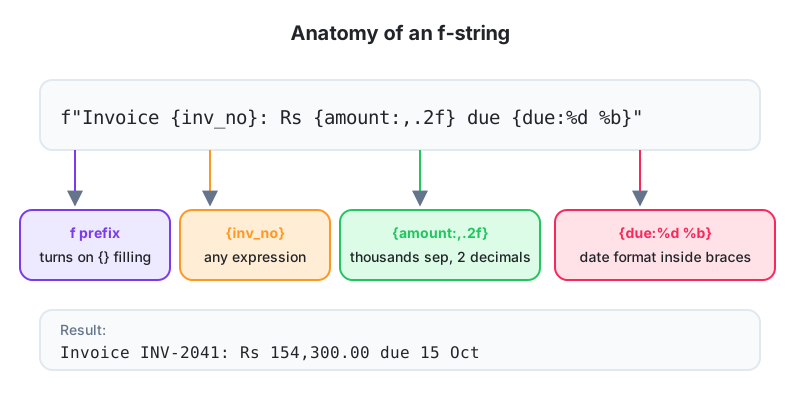
An f-string is a string with an f in front of the opening quote. Anything inside curly braces gets evaluated and dropped into the text. It replaces the clumsy chain of + and str() from Lesson 4, and we don't accept assignments that still use that chain after this lesson.
shop = "Saddar Mobile Point"
sold = 12
price = 38500

print(f"{shop} sold {sold} phones for Rs {sold * price}")
# Saddar Mobile Point sold 12 phones for Rs 462000
The braces can hold any expression. Arithmetic, function calls, method calls like {name.upper()}, even a conditional expression.
Format specifiers
A colon inside the braces, followed by a specifier, controls how the value is shown.
| Specifier | Meaning | value = 1234567.891 |
|---|---|---|
{value:.2f} | 2 decimal places | 1234567.89 |
{value:,} | Thousands separator | 1,234,567.891 |
{value:,.0f} | Separator, no decimals | 1,234,568 |
{0.173:.1%} | Percentage | 17.3% |
{42:05d} | Zero-pad to width 5 | 00042 |
{"Lahore":<10} | Left align in 10 chars | Lahore |
{"Lahore":>10} | Right align | Lahore |
{"Lahore":^10} | Centre | Lahore |
revenue = 1234567.891
growth = 0.173
print(f"Revenue: Rs {revenue:,.2f}")     # Revenue: Rs 1,234,567.89
print(f"Growth: {growth:.1%}")           # Growth: 17.3%
print(f"Invoice {42:05d}")               # Invoice 00042
One thing to know about the comma separator. Python groups in threes (12,34,567 becomes 1,234,567), while Pakistani finance teams often write 12,34,567 in lakhs and crores. If a client insists on lakh grouping you'll have to write it yourself. We usually talk them into standard grouping instead, because every downstream tool expects it.
Worked example, a table that lines up
Alignment specifiers let you print columns that sit under each other, which matters when the output lands in a terminal or gets pasted into an email.
rows = [("Lahore", 412500.5), ("Karachi", 1289000), ("Peshawar", 98750.25)]

print(f"{'City':<10}{'Sales (PKR)':>15}")
print("-" * 25)
for city, sales in rows:
    print(f"{city:<10}{sales:>15,.2f}")
City          Sales (PKR)
-------------------------
Lahore         412,500.50
Karachi      1,289,000.00
Peshawar        98,750.25
Watch the quotes. Inside an f-string delimited by double quotes, use single quotes for any string literal in the braces.
Debugging with f-strings
Put = after an expression and Python prints the expression and its value together. This is the quickest debugging trick we know, and it's the first thing we show a student who's been staring at a wrong number for ten minutes.
units = 342
rate = 23.5
print(f"{units=}, {rate=}, {units * rate=}")
# units=342, rate=23.5, units * rate=8037.0
Older styles you'll meet in other people's code
print("Total: {:.2f}".format(8037.0))    # .format() method, pre-2016 style
print("Total: %.2f" % 8037.0)            # printf style, very old
Both still run, and you'll see plenty of .format() in scripts written before 2016. Read them when you meet them. Write f-strings.
Results slips at a Rawalpindi school: The school prints slips for about 1,400 students. The old spreadsheet mail-merge showed marks like
78.66666667and percentages without a sign, and parents kept phoning to ask what the numbers meant. A short script usingf"{marks:.1f}"andf"{pct:.1%}"produces clean slips, and the same script sends the principal one formatted line per class, such asClass 9-B: avg 71.4%, top scorer Hira Baig (94.5%).
One line to remember
{value:,.2f} is the money format you'll type most often, so learn it by heart. Around it, keep in mind that print takes sep and end, that input() always returns a string, that f-strings accept any expression in braces with an optional :spec after it, and that {expr=} is your debugging friend.
Practise it tonight
- Ask the user for a product name, quantity and unit price, then print a line like
3 x Notebook @ Rs 250.00 = Rs 750.00. - Print a three-row table of employees (name, department, salary) with the salary right-aligned and using a thousands separator.
- Given
target = 500000andachieved = 412500, print the shortfall in rupees and the achievement as a percentage with one decimal.
Lesson 5 of 26
Sign in to track your progress and earn XP for every lesson you finish.
Practice tip: the built-in code runner is being upgraded. Until it is back, copy the examples into any SQL or Python tool you have (for example SQLite, PostgreSQL, MySQL, SQL Server or a free online editor) and run them there. You can keep reading and earning XP here.