
☰ Learn Python Tutorial Menu
Variables and Data Types
Written by Faisal Adnan · Updated 26 Sept 2026 · 5 min read
A student in one of our Rawalpindi batches once summed a column of meter readings and got a number with forty digits. Nothing had crashed. Python had done exactly what it was told, which was to join text together, because every "number" in that column was actually a string. Everything in a program has a type, the type decides what an operation does, and most confusing beginner errors come down to holding the wrong one. Sort that out now and Lessons 3 to 15 get a lot easier.
Variables are labels, not boxes
You create a variable the moment you assign a value to a name with =. We tell students to picture a sticky label, not a box. The label can be peeled off and stuck on a different value later, and two labels can sit on the same value at once.
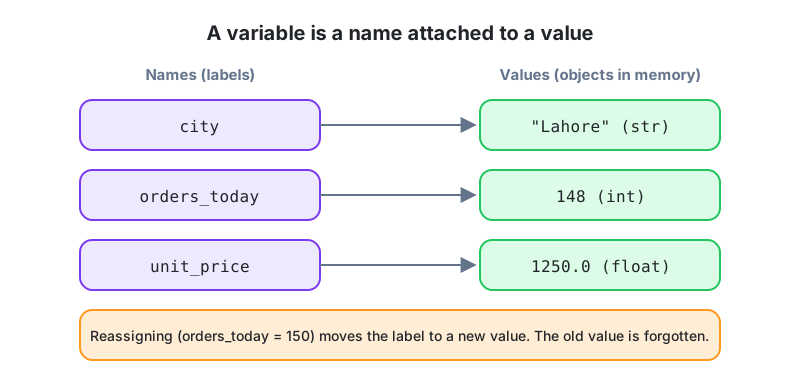
city = "Lahore"
orders_today = 148
unit_price = 1250.0

print(city, orders_today, unit_price)

orders_today = 150        # move the label to a new value
print(orders_today)
Naming rules we actually enforce
- Lowercase words joined by underscores, so
total_salesandcustomer_city. This is snake_case and it's the Python convention. - Letters, digits and underscores only, and the first character can't be a digit.
- Case matters.
Totalandtotalare two different variables, which is a bug we see every single batch. - Stay away from Python keywords like
if,forandclass, and from built-in names likelistandsum. Naming a variablesumworks right up until you need the realsum()three lines later. - Pick names that say what they hold.
xis fine in a two-line test. In a script your colleague inherits, writemonthly_revenue.
The core types
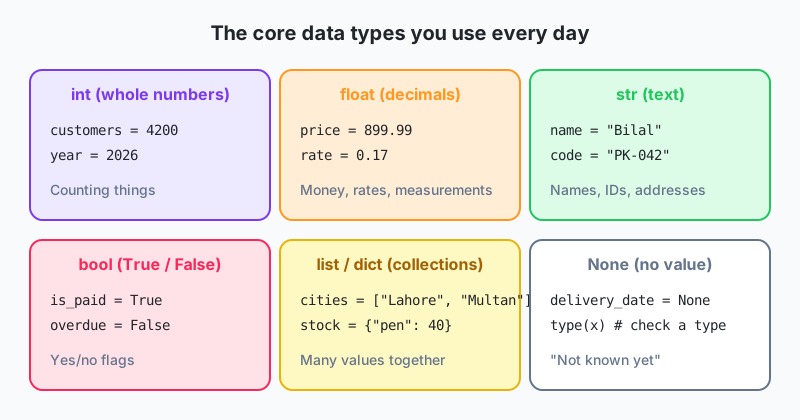
| Type | Example | Used for |
|---|---|---|
int | 4200 | Whole numbers: counts, years, IDs |
float | 899.99 | Decimals: prices, rates, averages |
str | "Bilal" | Text of any length, including digits stored as text |
bool | True / False | Yes/no flags, results of comparisons |
list | ["Lahore", "Multan"] | Ordered collection (Lesson 8) |
dict | {"pen": 40} | Key to value mapping (Lesson 10) |
NoneType | None | "No value yet" or "not applicable" |
Not sure what you're holding? Ask with type().
print(type(4200))        # <class 'int'>
print(type(899.99))      # <class 'float'>
print(type("Bilal"))     # <class 'str'>
print(type(True))        # <class 'bool'>
print(type(None))        # <class 'NoneType'>
Dynamic typing, and where it bites
Python is dynamically typed. You never declare a type, the value carries it around. That's convenient, but two values that look identical on screen can behave completely differently. Here's the forty-digit bug from the opening, in miniature.
amount_from_csv = "2500"      # CSV files always give you text
amount_from_app = 2500

print(amount_from_csv + amount_from_csv)   # "25002500"  (text joined)
print(amount_from_app + amount_from_app)   # 5000        (numbers added)
Both lines run without complaint. Only one gives the answer you wanted. Anything that arrives from a file, a web form or an API is text until you say otherwise, so check the type and convert.
Converting between types
The type names double as conversion functions.
print(int("2500") + 100)       # 2600
print(float("17.5") * 2)       # 35.0
print(str(2026) + "-Q1")       # "2026-Q1"
print(int(19.99))              # 19   (cuts off the decimal, no rounding)
print(round(19.99))            # 20
print(bool(0), bool(""), bool("no"))   # False False True
Conversion can fail. int("Rs 2500") raises ValueError because of the letters and the space. Lesson 13 shows you how to catch that safely. For now, clean the text first with int("Rs 2500".replace("Rs ", "")). And notice that int(19.99) gives 19, not 20. If you're truncating a rupee amount you probably wanted round().
Multiple assignment and swapping
Python lets you assign several names in one line, which reads nicely for small records, and the same trick swaps two values without a temporary variable. Interviewers in Lahore like asking for the swap.
branch, manager, staff = "Gulberg", "Ayesha Khan", 14
print(manager, "runs", branch, "with", staff, "staff")

a, b = 10, 20
a, b = b, a            # swap without a temporary variable
print(a, b)            # 20 10
The K-Electric column that wouldn't add up: A billing analyst we mentored loaded meter readings where the
unitscolumn held text like"0342". A junior colleague summed it and got one giant string. Converting each value withint()fixed the total and also dropped the leading zero, which is what you want for a numeric reading. The same column had"N/A"for faulty meters, andint()rejects that. Those rows were set toNoneand reported on their own, which is the right outcome. A faulty meter is not a zero reading.
Constants and None
Python has no real constants. The convention is UPPER_CASE for values that shouldn't change, such as GST_RATE = 0.17, and everyone on the team respects it. None means "unknown" or "not set yet", like the delivery date for an order that hasn't shipped, or the manager of the person at the top of the org chart. Test for it with is, never ==, as in if delivery_date is None:.
Quick recap
- A variable is a name attached to a value. Assignment with
=creates it or moves it. - snake_case, descriptive names, and no keywords or built-in names.
- The core types are
int,float,str,boolandNone. Collections come in Lessons 8 to 10. - Data from files and forms arrives as text. Convert with
int(),float()orstr()before you do maths. - When something behaves oddly,
type()is the first thing to print.
Homework
- Create variables for a Faisalabad textile order: fabric name, metres ordered (integer), price per metre (float) and whether it is export quality (boolean). Print each with its type.
- Given
reading = "0451", convert it to a number, add 25, and print the result as text with the prefix"Units: ". - Predict the output of
print("3" * 3)andprint(3 * 3), then run both to check.
Lesson 2 of 26
Sign in to track your progress and earn XP for every lesson you finish.
Practice tip: the built-in code runner is being upgraded. Until it is back, copy the examples into any SQL or Python tool you have (for example SQLite, PostgreSQL, MySQL, SQL Server or a free online editor) and run them there. You can keep reading and earning XP here.