
☰ Learn Python Tutorial Menu
Functions
Written by Faisal Adnan · Updated 26 Sept 2026 · 4 min read
A school in Rawalpindi had a results script that computed grades in six different places. Years of small edits meant each copy had slightly different boundaries, so the same student could get a B on the report card and a C on the merit list. Nobody had done anything wrong on any single day. The script had just grown by copy and paste. Functions are the cure. A function names a block of code, takes inputs, and hands back a result, so the same logic lives in one place and is reused everywhere.
Defining and calling
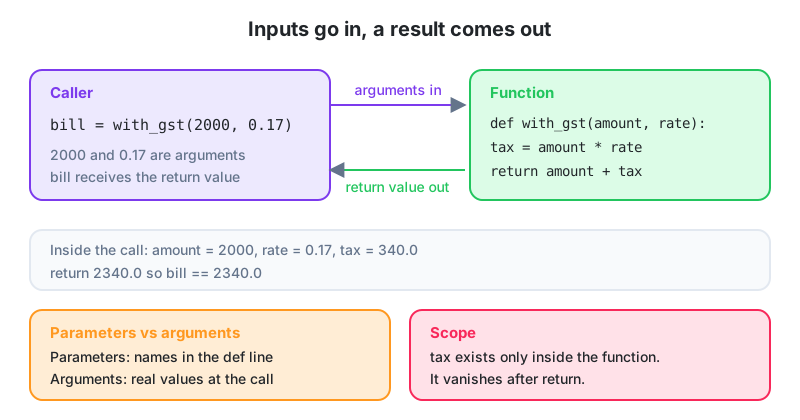
def with_gst(amount, rate):
    tax = amount * rate
    return amount + tax

bill = with_gst(2000, 0.17)
print(bill)                      # 2340.0
print(with_gst(500, 0.05))       # 525.0
def starts the definition, the name follows snake_case, and the names in parentheses are parameters. The indented body runs each time the function is called. return sends a value back and ends the function. The actual values passed in a call (2000, 0.17) are arguments.
A function with no return returns None. That's fine when the function only prints or saves something. But the number one "why is my result None?" question in our forum comes from a forgotten return.
Default and keyword arguments
def with_gst(amount, rate=0.17):
    return amount * (1 + rate)

print(with_gst(2000))                 # uses the default 0.17 -> 2340.0
print(with_gst(2000, 0.05))           # positional override
print(with_gst(rate=0.05, amount=2000))   # keyword arguments, any order
Parameters with defaults go after those without. Keyword arguments make a call explain itself. send_report(to="ceo@firm.pk", attach=True) reads far better than send_report("ceo@firm.pk", True).
Never use a mutable default like def add(item, basket=[]). That one list is shared between every call, so items pile up mysteriously. Use basket=None and create the list inside the function. This is a favourite interview trap.
Returning several values
def summarise(values):
    total = sum(values)
    return total, total / len(values), max(values)

t, avg, hi = summarise([120, 95, 140, 210, 180])
print(f"total {t}, average {avg:.1f}, highest {hi}")
Python packs the values into a tuple and the caller unpacks them, exactly as in Lesson 9.
Scope, or where names live
rate = 0.17                     # global

def calc(amount):
    tax = amount * rate         # can read the global
    return tax

print(calc(1000))               # 170.0
print(tax)                      # NameError: tax exists only inside calc
Variables created inside a function are local. They appear when the function runs and vanish when it returns. A function can read globals, but assigning to one inside a function creates a new local instead, which confuses everyone at least once. Our rule is simple. Pass in what the function needs, return what it produces, and don't rely on globals. That's what makes a function testable on its own.
Docstrings and type hints
def late_fee(days_late: int, daily_rate: float = 50.0) -> float:
    """Return the late fee in PKR for an overdue invoice.

    The first 3 days are free; each further day costs daily_rate.
    """
    if days_late <= 3:
        return 0.0
    return (days_late - 3) * daily_rate

help(late_fee)          # prints the docstring
The triple-quoted string right after def is the docstring. It says what the function does, and editors and tools display it. Type hints (: int, -> float) don't change behaviour, but they document what's expected and let your editor catch mistakes before you run anything. Start both habits now. Hiring managers notice.
*args and **kwargs
def total(*amounts):
    return sum(amounts)

print(total(100, 250, 40))      # 390

def describe(**fields):
    for key, value in fields.items():
        print(f"{key}: {value}")

describe(name="Hira", city="Rawalpindi")
*amounts collects any number of positional arguments into a tuple. **fields collects keyword arguments into a dict. You'll see both all over library documentation even if you rarely write them yourself.
Worked example, breaking a script into functions
def clean_amount(text):
    """Turn 'Rs 2,500' or ' 2500 ' into 2500.0."""
    return float(text.replace("Rs", "").replace(",", "").strip())

def categorise(amount):
    if amount >= 100000:
        return "large"
    if amount >= 10000:
        return "medium"
    return "small"

def report(raw_amounts):
    counts = {"small": 0, "medium": 0, "large": 0}
    for raw in raw_amounts:
        counts[categorise(clean_amount(raw))] += 1
    return counts

print(report(["Rs 2,500", " 15000 ", "Rs 120,000", "800"]))
# {'small': 2, 'medium': 1, 'large': 1}
Each function does one job and can be tested alone. clean_amount("Rs 2,500") should give 2500.0, and you can check that in two seconds. If the categories change, only categorise changes.
How the school fixed it: One
grade(marks)function, called from all six places. When the board moved the A threshold from 80 to 85, it was a one-line change instead of a hunt through 900 lines, and the report card and the merit list finally agreed with each other.
Five habits
def name(params):defines,name(args)calls,returnsends back a result.- No
returnmeans the function returnsNone. - Defaults and keyword arguments make calls flexible and readable. Never use a mutable default.
- Local variables live only inside the function. Pass data in, return data out.
- Write a docstring and type hints, and keep each function to one job.
Write these
- Write
slab_bill(units)implementing the K-Electric slabs from Lesson 6, then call it for 80, 250 and 342 units. - Write
normalise_name(raw)that strips, collapses spaces and title-cases a name, with a docstring and type hints. - Write
stats(values)that returns the minimum, maximum and mean as a tuple, and unpack the result in a call.
Lesson 11 of 26
Sign in to track your progress and earn XP for every lesson you finish.
Practice tip: the built-in code runner is being upgraded. Until it is back, copy the examples into any SQL or Python tool you have (for example SQLite, PostgreSQL, MySQL, SQL Server or a free online editor) and run them there. You can keep reading and earning XP here.